


 DJ TOTY GEE

At moment there is a way to import playlist from any software, but not from itunes.
i personally prepare the playlists on itunes so i can use them everywhere, but i want sync them with virtual dj.
i personally prepare the playlists on itunes so i can use them everywhere, but i want sync them with virtual dj.
Posted yesterday @ 10:59 pm
 DJ VinylTouch

Pretty sure reading of iTunes/Music App playlists is working and has been working for quite a while now (I used it as recently as today):
https://virtualdj.com/manuals/virtualdj/interface/database/playlists.html
Perhaps you didn't enable the iTunes folder or have changed some other required iTunes related option in your settings?
https://virtualdj.com/manuals/virtualdj/interface/database/playlists.html
Perhaps you didn't enable the iTunes folder or have changed some other required iTunes related option in your settings?
Posted yesterday @ 11:04 pm
DJ TOTY GEE
DJ VinylTouch wrote :
Pretty sure reading of iTunes/Music App playlists is working and has been working for quite a while now (I used it as recently as today):
https://virtualdj.com/manuals/virtualdj/interface/database/playlists.html
Perhaps you didn't enable the iTunes folder or have changed some other required iTunes related option in your settings?
https://virtualdj.com/manuals/virtualdj/interface/database/playlists.html
Perhaps you didn't enable the iTunes folder or have changed some other required iTunes related option in your settings?
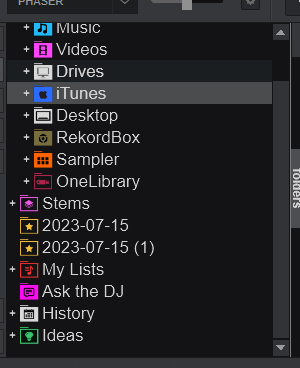
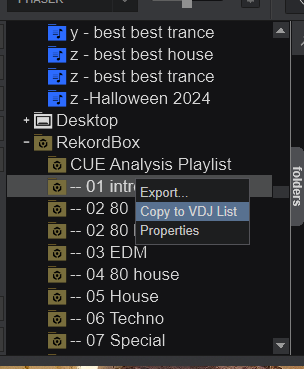
of course there is the itunes playlist... i want impost ans synk in "my list" you see the red folder it is possible to import from Rekordbox playlists.... but not from itunes
Posted 15 hours ago
DJ VinylTouch
Just create a Virtual Folder and drag all of the songs from the iTunes playlist into that Virtual folder?
What you are asking for is a convenience option (a context menu option that does what I described in the background), you can import the playlist content, just manually.
What you are asking for is a convenience option (a context menu option that does what I described in the background), you can import the playlist content, just manually.
Posted 14 hours ago
DJ TOTY GEE
DJ VinylTouch wrote :
Just create a Virtual Folder and drag all of the songs from the iTunes playlist into that Virtual folder?
What you are asking for is a convenience option (a context menu option that does what I described in the background), you can import the playlist content, just manually.
What you are asking for is a convenience option (a context menu option that does what I described in the background), you can import the playlist content, just manually.
It is what I do at the moment... I would like something automatic! This is what I am asking! A simple playlist sync like the one inside Rexordbox.... Also, if I drag, there will be duplicates if it's an old playlist
So I need to waste my time checking what is there and what is not...
Posted 13 hours ago
 groovindj
@DJ Toty Gee
When you're replying to someone in a post, you don't need to quote their entire message before you reply.
Firstly because it's already right there above your reply (and isn't going to disappear) and secondly because it's obvious who you're replying to.
It particularly applies when there are just two people in the discussion, but even when more people comment, the thread is linear so a reply below another is regarded as following on from it.
If you need to clarify who the reply is for, just use their name. 👍
When you're replying to someone in a post, you don't need to quote their entire message before you reply.
Firstly because it's already right there above your reply (and isn't going to disappear) and secondly because it's obvious who you're replying to.
It particularly applies when there are just two people in the discussion, but even when more people comment, the thread is linear so a reply below another is regarded as following on from it.
If you need to clarify who the reply is for, just use their name. 👍
Posted 13 hours ago
DJ VinylTouch
@OP on the topic - there is already a "No Duplicates" option for Virtual Folders for this case.
Again, I'm not against what you asked for, I'm just saying that what you are asking for is a convenience function for what can already be done.
Again, I'm not against what you asked for, I'm just saying that what you are asking for is a convenience function for what can already be done.
Posted 13 hours ago
DJ TOTY GEE
No, the sync is not there
I am just asking what all the other dj software has: sync of the playlist, that's it.
The duplicate function and automatic synchronisation are 2 different things.
Automatic sync doesn't require me to do anything, especially if I have many playlists.
I am just asking what all the other dj software has: sync of the playlist, that's it.
The duplicate function and automatic synchronisation are 2 different things.
Automatic sync doesn't require me to do anything, especially if I have many playlists.
Posted 13 hours ago
DJ VinylTouch
No one is arguing with the right click sync functionality, I'm just saying that you can achieve the goal, just not in a right-click context (it is equal to the manual steps described above + naming the virtual folder similarly).
Posted 12 hours ago
DJ TOTY GEE
The Topic is playlist sync.....
If you work with playlists, you know they're constantly changing...
Playlist sync will solve the problem.
End of story!
If you work with playlists, you know they're constantly changing...
Playlist sync will solve the problem.
End of story!
Posted 12 hours ago
DJ VinylTouch
It actually won't because if you are changing the playlist you'll have to right click and reimport - none of the import from playlist implementations are active syncs.
It's okay to want a feature - you don't have to say silly things as a part of the desire.
It's okay to want a feature - you don't have to say silly things as a part of the desire.
Posted 10 hours ago
groovindj
Why not work the other way around? Make the playlist in VirtualDJ first, then export it.
Posted 10 hours ago
DJ VinylTouch
Not always convenient (pretty much all the DJ software support reading the iTunes/Music library and playlists), especially if you buy music from the Music store.
I personally use a "Recently Added" Smart Playlist for such music from the Apple Music Store, and then add them to the Search DB from within VirtualDJ using the existing integration.
VirtualDJ's filter folders are way more powerful than the Smart Playlists in iTunes/Music, especially as you can use VDJscript in the filter syntax.
I personally use a "Recently Added" Smart Playlist for such music from the Apple Music Store, and then add them to the Search DB from within VirtualDJ using the existing integration.
VirtualDJ's filter folders are way more powerful than the Smart Playlists in iTunes/Music, especially as you can use VDJscript in the filter syntax.
Posted 10 hours ago
DJ TOTY GEE
DJ VinylTouch wrote :
It actually won't because if you are changing the playlist you'll have to right click and reimport - none of the import from playlist implementations are active syncs.
It's okay to want a feature - you don't have to say silly things as a part of the desire.
It's okay to want a feature - you don't have to say silly things as a part of the desire.
is not possible to import an iTunes playlist into a vdj playlist... but if you find a way, please give me a screenshot. I want to see how you import a playlist from an iTunes playlist to a vdj playlist.
i want to see the "import playlist" button, please.
Posted 7 hours ago
DJ VinylTouch
You'r e arguing for the sake of arguing now, which is a bit disturbing.
If you want to import songs from an iTunes/Music playlist:
I did this as recently as 10 minutes ago.
FYI, there is no "live sync" for any of the local application databases - what you have is a reload of the playlists/crates (which is already done for iTunes/Music), and in the Rekordbox/Serato case, an option to "Import" a crate/playlist, which just does the steps I outlined above for the most current state of the crate/playlist that was read by the application for the current session, and that is not a live sync (something that VirtualDJ automatically does on startup or revisit), most likely for performance reasons.
You're request is just to add that automation option for iTunes/Music and I'm for it.
It is not, however, a live sync - if you make changes outside of VirtualDJ, you have to reload the playlist and reimport it again (manually)
If you want to import songs from an iTunes/Music playlist:
- Go to Local Music > iTunes (make sure you have iTunes/Music setup to export the Library as xml)
- Select the playlist you want after VirtualDJ loads the library
- Select all songs in the playlist and drag them to a VirtualDJ Virtual Folder
I did this as recently as 10 minutes ago.
FYI, there is no "live sync" for any of the local application databases - what you have is a reload of the playlists/crates (which is already done for iTunes/Music), and in the Rekordbox/Serato case, an option to "Import" a crate/playlist, which just does the steps I outlined above for the most current state of the crate/playlist that was read by the application for the current session, and that is not a live sync (something that VirtualDJ automatically does on startup or revisit), most likely for performance reasons.
You're request is just to add that automation option for iTunes/Music and I'm for it.
It is not, however, a live sync - if you make changes outside of VirtualDJ, you have to reload the playlist and reimport it again (manually)
Posted 7 hours ago