


 Elvis Brown

Hello
I'm having a problem with Stems. When I load a track onto one deck, all Stem functions are available and work as expected. However, when I load the same track onto the opposite deck, the Bass and Instrument stems are unavailable and appear greyed out, while the other stem functions remain accessible.
I have already prepared the track for Stems analysis, but this has not resolved the issue. The behaviour is consistent, with the same track working correctly on one deck and not on the other.
Could you please help identify the cause of this issue? Thanks
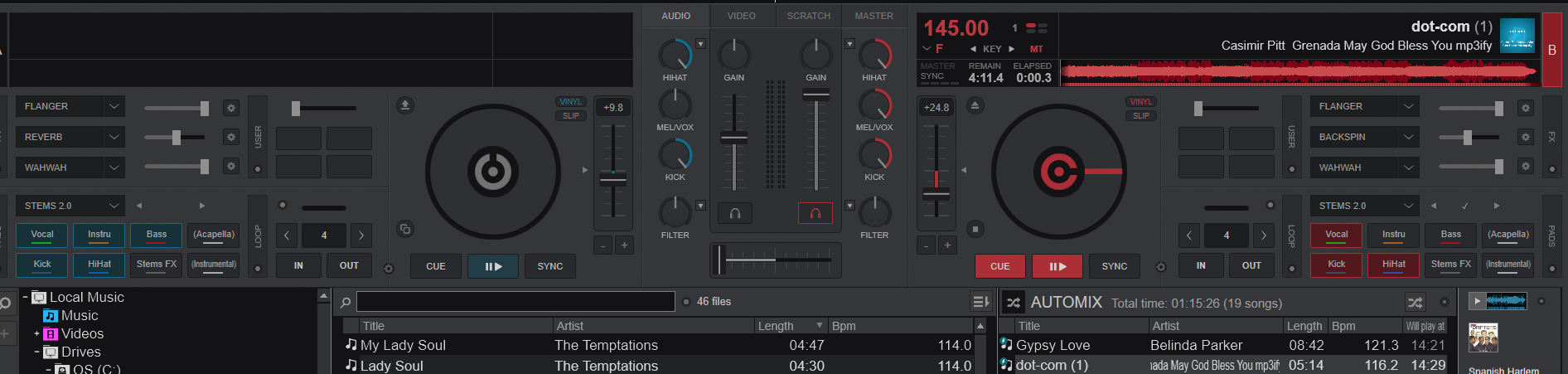
I'm having a problem with Stems. When I load a track onto one deck, all Stem functions are available and work as expected. However, when I load the same track onto the opposite deck, the Bass and Instrument stems are unavailable and appear greyed out, while the other stem functions remain accessible.
I have already prepared the track for Stems analysis, but this has not resolved the issue. The behaviour is consistent, with the same track working correctly on one deck and not on the other.
Could you please help identify the cause of this issue? Thanks
Posted 3 days ago @ 2:42 pm
Adion
You have MEL/VOX knob on the mixer all the way to the right
Posted 3 days ago @ 3:13 pm
 DeeJaY_Fr0sT

i think you use 4 channels mixer and u keep the eq knobs not on the mid. so fix channel 1 and 4 to first one on the left and the last one on the right both eq to the mid.
Posted 2 days ago @ 4:13 am
 DJ VinylTouch

Please read what the various positions of the MEL/VOX knob do from the ModernEQ section of the Mixer page in the user manual:
https://virtualdj.com/manuals/virtualdj/interface/mixer/audio.html
Specifically it say this
Killing stems are shown with the pads switched off.
It is advised that you understand exactly how Stem EQs work before trying to use them, and especially if you are mixing the usage with Stem Pads (which is probably not advised, since using Stem EQ modes implies fine-grained stem part adjustment, while stem pad modes imply on/off switching of stem parts).
https://virtualdj.com/manuals/virtualdj/interface/mixer/audio.html
Specifically it say this
Quote :
The middle knob will let you adjust both the vocals and melody to avoid clashes. Turning the middle knob to the full left will kill both the melody and vocals. Half-way to the left will kill only the vocals. While turning to the right will first boost a little vocal, while all the way will kill the melody
The middle knob will let you adjust both the vocals and melody to avoid clashes. Turning the middle knob to the full left will kill both the melody and vocals. Half-way to the left will kill only the vocals. While turning to the right will first boost a little vocal, while all the way will kill the melody
Killing stems are shown with the pads switched off.
It is advised that you understand exactly how Stem EQs work before trying to use them, and especially if you are mixing the usage with Stem Pads (which is probably not advised, since using Stem EQ modes implies fine-grained stem part adjustment, while stem pad modes imply on/off switching of stem parts).
Posted 2 days ago @ 12:07 pm