


 DJ Faber Zee

Hello VDJ fam!
At tonight’s gig, I was expecting a Pioneer XDJ-RX2, but the venue actually had an XDJ-RX. I’ve had issues with this particular model before, and tonight I ran into problems again.
The firmware, drivers and VirtualDJ are all updated to the latest releases. My laptop runs Windows 11 with all the latest patches installed.
Here’s the setup sequence I followed:
1. Connected the XDJ-RX and my DDJ-XP2 to the laptop.
2. Launched VirtualDJ and selected the XDJ-RX.
3. Pressed the MIDI button on the controller, followed by the Deck 1 and Deck 2 buttons.
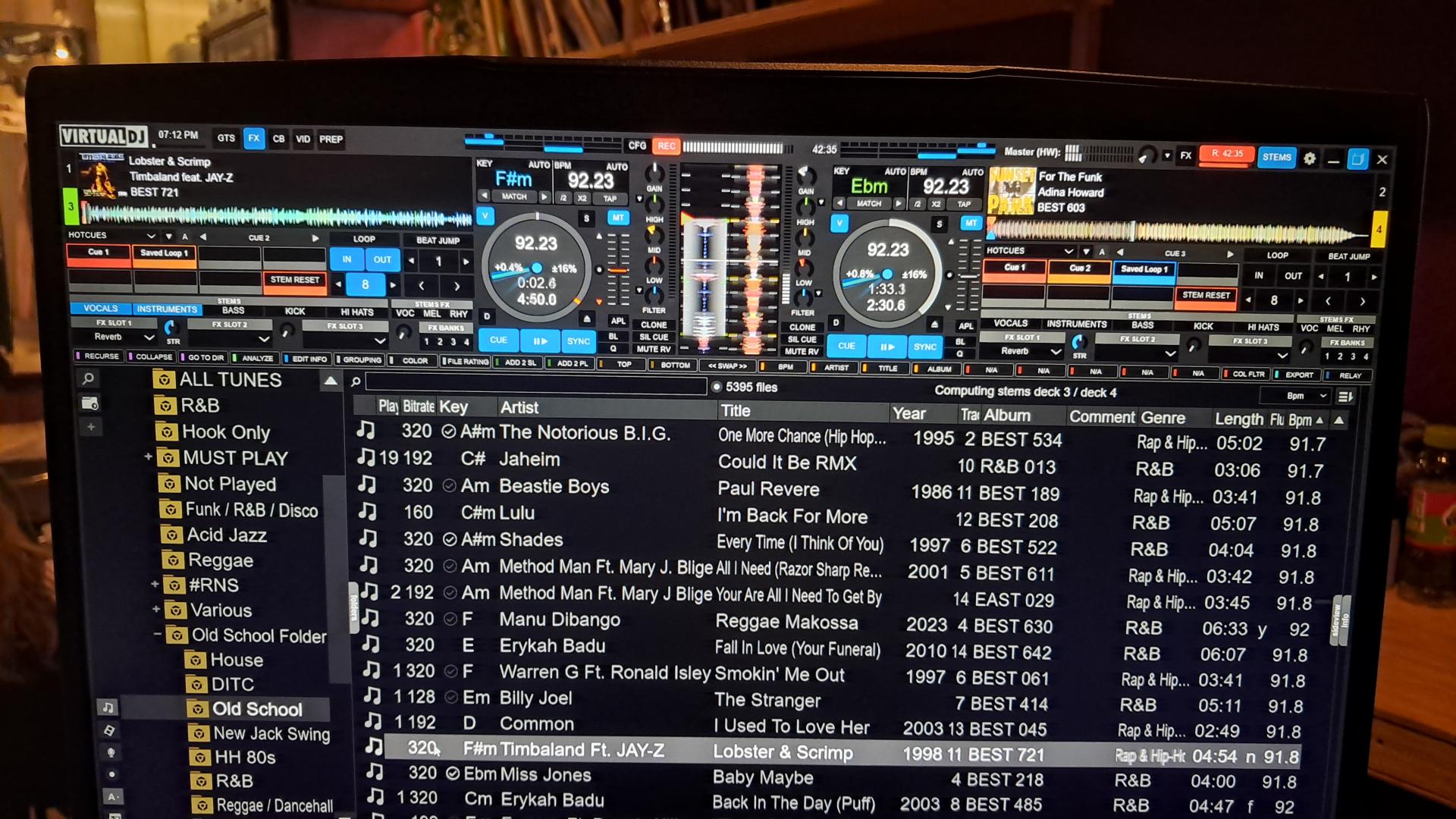
Initially, I noticed some strange behaviour with the stems effects. Looking more closely, I realised I was somehow controlling Decks 3 and 4 instead of Decks 1 and 2. I’m not sure why.
While Deck 3 was playing, I loaded a track onto Deck 2 and tried to mix it in. I could hear Deck 2 through the master output even though its channel fader was all the way down.
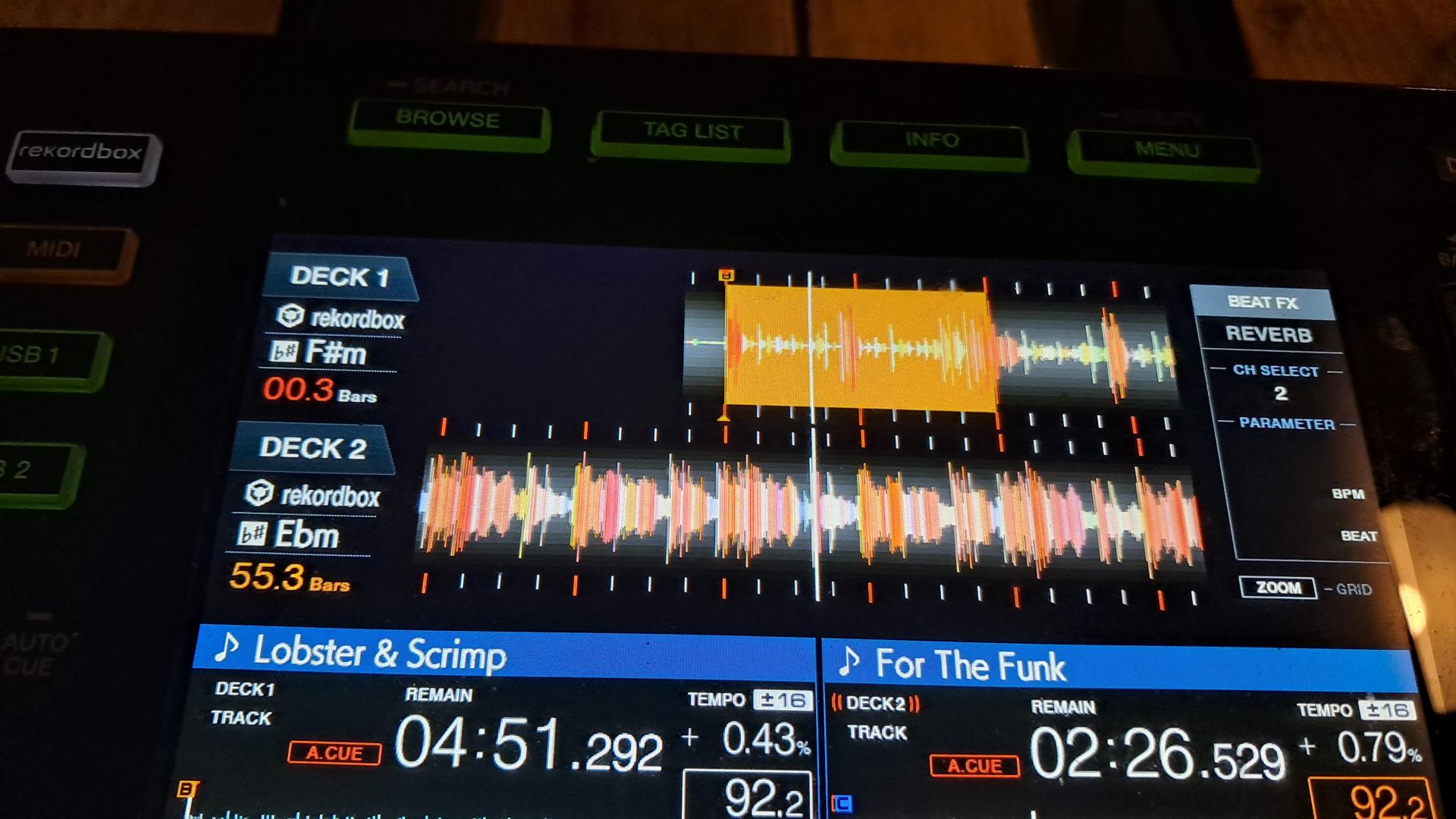
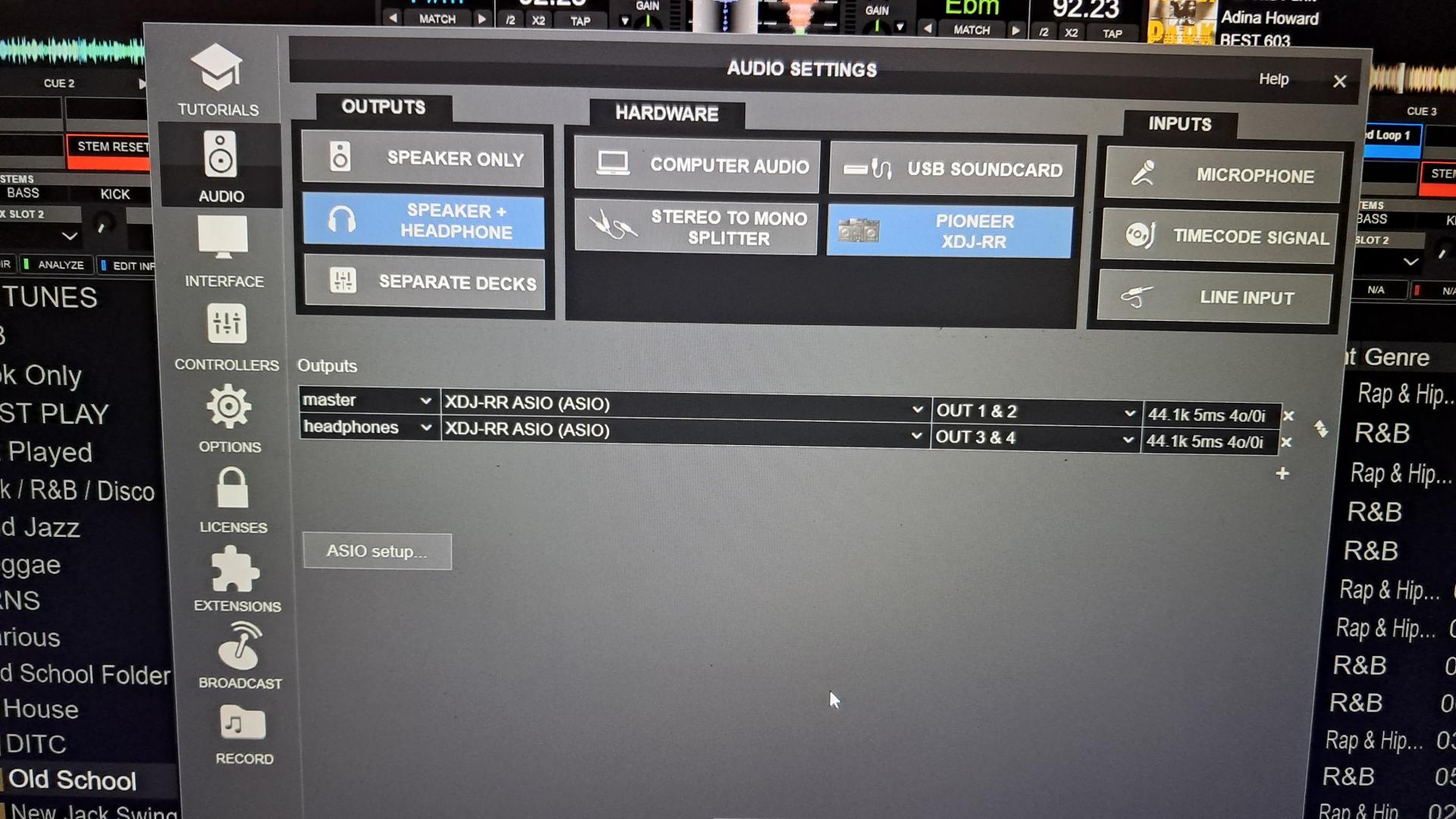
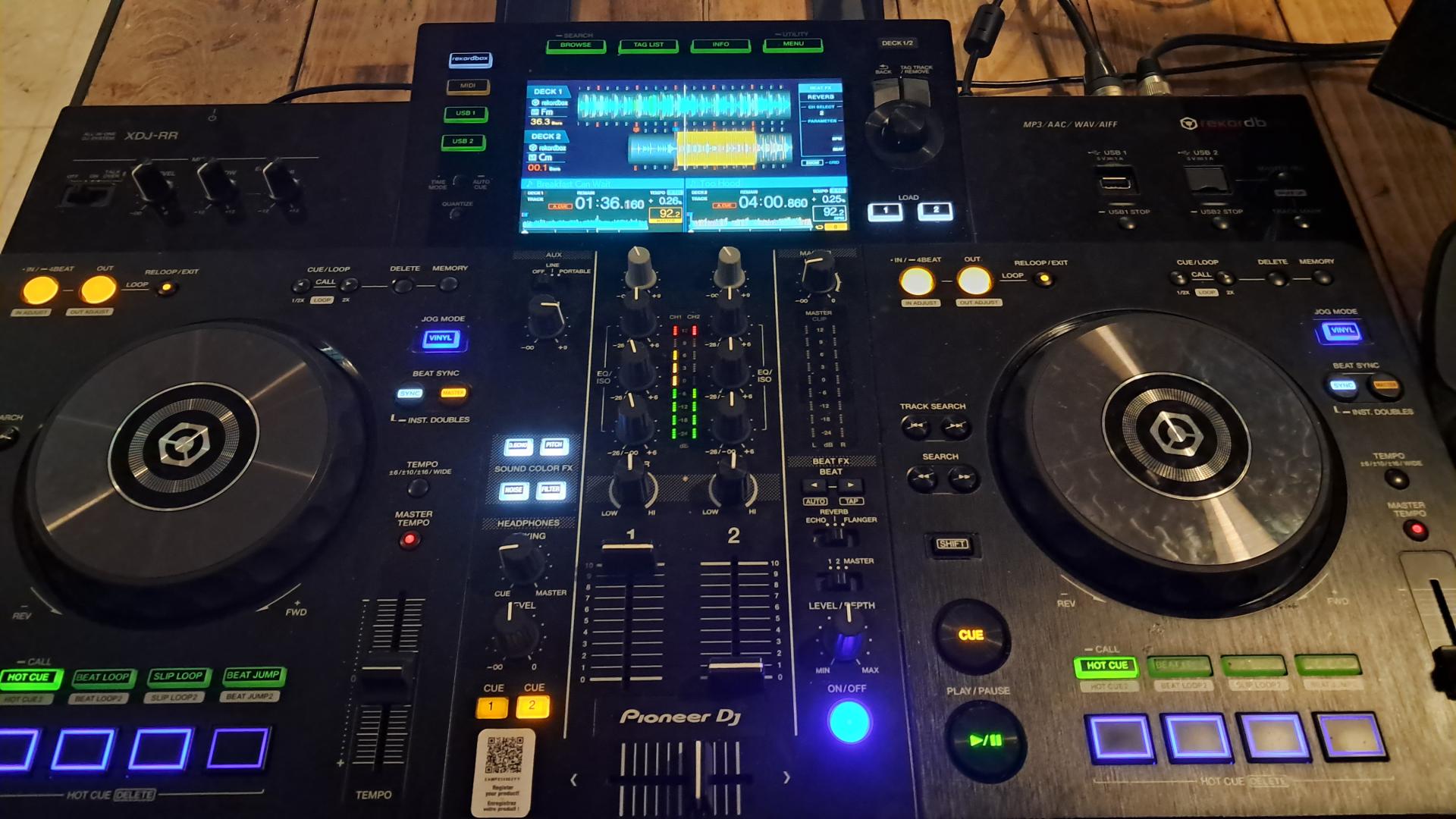
I’ve attached some pictures showing the setup.
Has anyone experienced something similar, or can anyone help me understand what might have gone wrong?
Thanks!
At tonight’s gig, I was expecting a Pioneer XDJ-RX2, but the venue actually had an XDJ-RX. I’ve had issues with this particular model before, and tonight I ran into problems again.
The firmware, drivers and VirtualDJ are all updated to the latest releases. My laptop runs Windows 11 with all the latest patches installed.
Here’s the setup sequence I followed:
1. Connected the XDJ-RX and my DDJ-XP2 to the laptop.
2. Launched VirtualDJ and selected the XDJ-RX.
3. Pressed the MIDI button on the controller, followed by the Deck 1 and Deck 2 buttons.
Initially, I noticed some strange behaviour with the stems effects. Looking more closely, I realised I was somehow controlling Decks 3 and 4 instead of Decks 1 and 2. I’m not sure why.
While Deck 3 was playing, I loaded a track onto Deck 2 and tried to mix it in. I could hear Deck 2 through the master output even though its channel fader was all the way down.
I’ve attached some pictures showing the setup.
Has anyone experienced something similar, or can anyone help me understand what might have gone wrong?
Thanks!
Posted Thu 22 Oct 26 @ 7:37 pm
 PhantomDeejay

Do you mean XDJ-RR ?
This is not XDJ-RX :P
And the main difference between the two is that XDJ-RX is a 4 decks unit (with a 2 channel mixer) while XDJ-RR is strictly a 2 deck unit.
I don't know what went wrong. Most likely the deck assignment in the mappers tab got mixed up (since you had also DDJ-XP2 that's a 4 decks controller connected at the same time) and it ended up controlling decks 3 & 4.
It should be an easy fix from the mappers tab in settings. You should just change deck assignment and everything should work as expected.
However, that explains your "other" issue.
Since the unit was set to control decks 3&4 and it's not a 4 decks controller, there was NOTHING that controlled deck 1 and deck 2 volume (besides the GUI)
This means that they were left "full open" which is the default startup state of VirtualDJ.
So.. If you ever have the same issue(s) remember to check deck assignment.
This is not XDJ-RX :P
And the main difference between the two is that XDJ-RX is a 4 decks unit (with a 2 channel mixer) while XDJ-RR is strictly a 2 deck unit.
I don't know what went wrong. Most likely the deck assignment in the mappers tab got mixed up (since you had also DDJ-XP2 that's a 4 decks controller connected at the same time) and it ended up controlling decks 3 & 4.
It should be an easy fix from the mappers tab in settings. You should just change deck assignment and everything should work as expected.
However, that explains your "other" issue.
Since the unit was set to control decks 3&4 and it's not a 4 decks controller, there was NOTHING that controlled deck 1 and deck 2 volume (besides the GUI)
This means that they were left "full open" which is the default startup state of VirtualDJ.
So.. If you ever have the same issue(s) remember to check deck assignment.
Posted Thu 22 Oct 26 @ 11:28 pm
DJ Faber Zee
RR sorry. and thanks for looking into it.
Do you mean here?
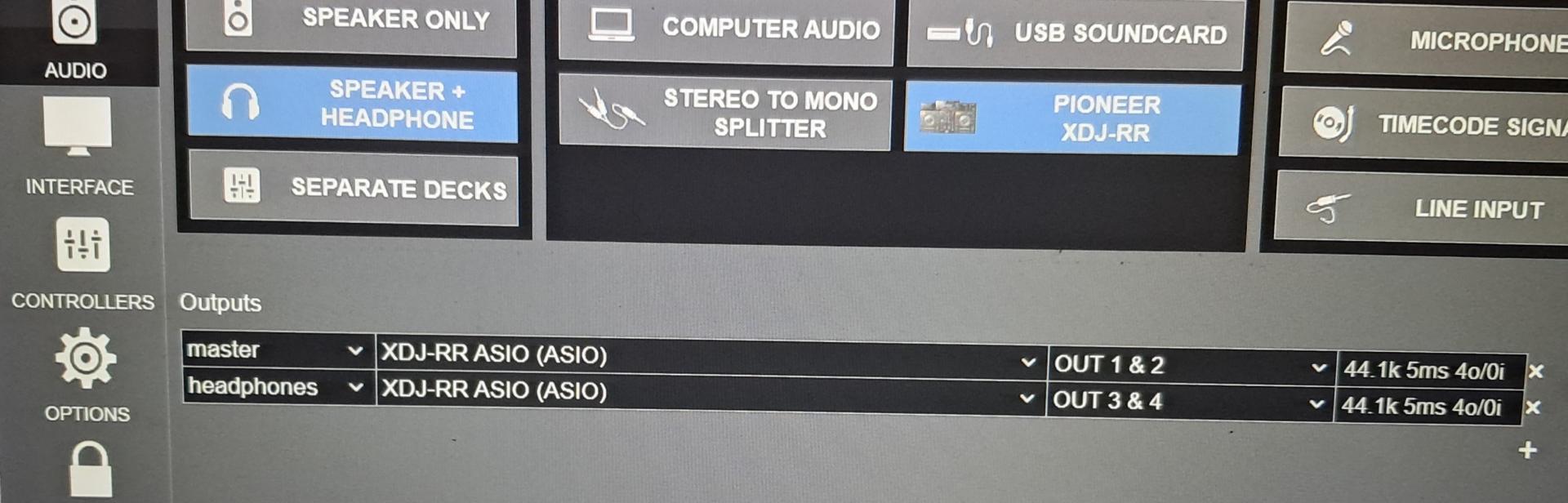
Do you mean here?
Posted Fri 23 Oct 26 @ 4:16 am
DJ Faber Zee
Another thing. I often use XDJ-RX2 (2 channels) with DDJ-XP2 and have no issues.
I believe another RR characteristics which may cause problems, is that the consolle has only 4 performance pads instead of the standard 8.
I believe another RR characteristics which may cause problems, is that the consolle has only 4 performance pads instead of the standard 8.
Posted Fri 23 Oct 26 @ 4:30 am
DJ Faber Zee
and please look at this
https://www.dropbox.com/scl/fi/g22qn3q247snlh4y07o5i/20261022_192718.mp4?rlkey=9c9f4gva8ag8iow31xy06njyr&dl=0
Because I will have another gig next week with the same controller, I dont want to run again into issues.
If you can suggest the test I should do upfront, it can be of very much needed help.
Thanks!
https://www.dropbox.com/scl/fi/g22qn3q247snlh4y07o5i/20261022_192718.mp4?rlkey=9c9f4gva8ag8iow31xy06njyr&dl=0
Because I will have another gig next week with the same controller, I dont want to run again into issues.
If you can suggest the test I should do upfront, it can be of very much needed help.
Thanks!
Posted Fri 23 Oct 26 @ 4:51 am
PhantomDeejay
No, I mean here:
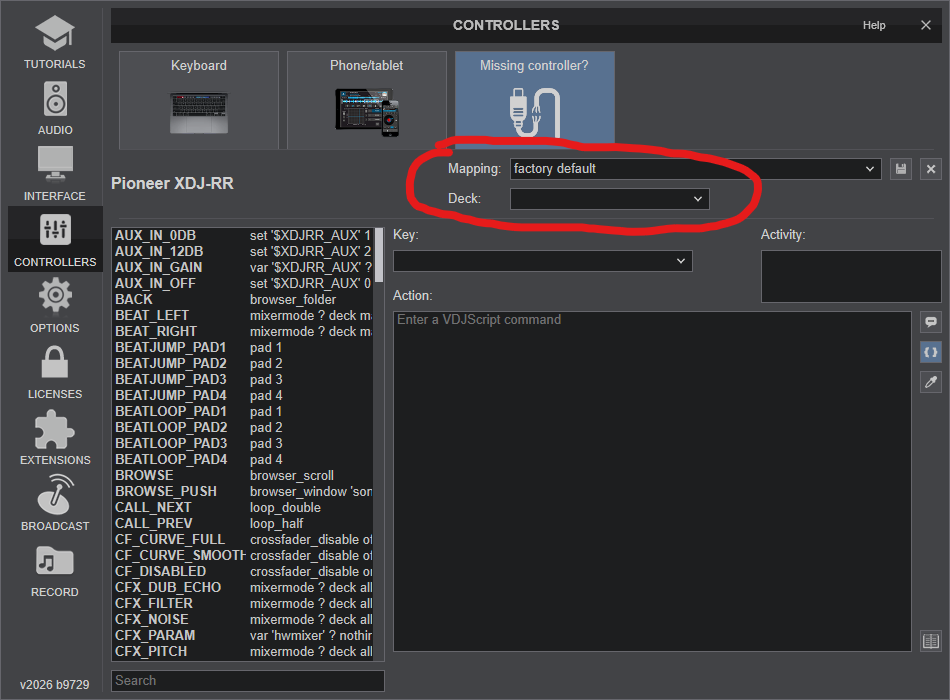
In my screenshot deck assignment is empty because the controller is not present.
PS: I can't understand what I'm supposed to take from the video.
Perhaps you could share more info ?
The fact that the screen shows deck1 and deck 2 means nothing, as this is a hardcoded graphic from the device firmware (in case that was what you were trying to show me)
On XDJ-RR you won't see "DECK 3" and "DECK 4" because the unit doesn't offer them (unlikely XDJ-RX)
PS2: We don't have access to a XDJ-RR. This means that we cannot really test anything, and if something needs to be done/tested we are glad to help, but you'll have to it on your own under our guidance! :)
XDJ-RX, XDJ-RX2 and XDJ-RX3 are all FOUR DECKS controllers, with a two "dual" channels mixer in the middle. Dual means that one channel toggles between decks 1 & 3 and the other between decks 2&4.
The number of mixer channels should not be confused with how many deck layers a unit is offering.
XDJ-RR is a TWO DECK controller with a two "single" channels mixer in the middle.
Here "single" means that the channel doesn't switch from deck 1 to deck 3 and back (or from deck 2 to deck 4) It stays all the time on deck 1 (or 2)
As I said, normally this should not be an issue.
But something went wrong somehow. So please next time check and confirm that deck assignment is correct.
And, NO, the number of pads has nothing to do with what you described.
In my screenshot deck assignment is empty because the controller is not present.
PS: I can't understand what I'm supposed to take from the video.
Perhaps you could share more info ?
The fact that the screen shows deck1 and deck 2 means nothing, as this is a hardcoded graphic from the device firmware (in case that was what you were trying to show me)
On XDJ-RR you won't see "DECK 3" and "DECK 4" because the unit doesn't offer them (unlikely XDJ-RX)
PS2: We don't have access to a XDJ-RR. This means that we cannot really test anything, and if something needs to be done/tested we are glad to help, but you'll have to it on your own under our guidance! :)
DJ Faber Zee wrote :
Another thing. I often use XDJ-RX2 (2 channels) with DDJ-XP2 and have no issues.
I believe another RR characteristics which may cause problems, is that the consolle has only 4 performance pads instead of the standard 8.
I believe another RR characteristics which may cause problems, is that the consolle has only 4 performance pads instead of the standard 8.
XDJ-RX, XDJ-RX2 and XDJ-RX3 are all FOUR DECKS controllers, with a two "dual" channels mixer in the middle. Dual means that one channel toggles between decks 1 & 3 and the other between decks 2&4.
The number of mixer channels should not be confused with how many deck layers a unit is offering.
XDJ-RR is a TWO DECK controller with a two "single" channels mixer in the middle.
Here "single" means that the channel doesn't switch from deck 1 to deck 3 and back (or from deck 2 to deck 4) It stays all the time on deck 1 (or 2)
As I said, normally this should not be an issue.
But something went wrong somehow. So please next time check and confirm that deck assignment is correct.
And, NO, the number of pads has nothing to do with what you described.
Posted Fri 23 Oct 26 @ 6:12 am
DJ Faber Zee
Thank you Phantom.
In the video I was showing how weirdly it was counting the bars...I will try to get my hands on the controller before the gig and share some results here.
PS if you could be so gentle to tell em when you would be available i can try to arranged with the venue as I do not own the controller.
In the video I was showing how weirdly it was counting the bars...I will try to get my hands on the controller before the gig and share some results here.
PS if you could be so gentle to tell em when you would be available i can try to arranged with the venue as I do not own the controller.
Posted Fri 23 Oct 26 @ 6:42 am
PhantomDeejay
DJ Faber Zee wrote :
Thank you Phantom.
In the video I was showing how weirdly it was counting the bars...
In the video I was showing how weirdly it was counting the bars...
Still from that short clip everything seems to work as expected ?
Deck 2 counts down as it should.
Deck 1 also counts down. After reaching 0 (you have reached the current cue) it counts down to the next cue. That's why it jumps from 0.0 to something like 72.something...
IIRC this is the expected behavior even with stand alone operation.
On newer models / Pioneer gear, I think that after reaching the cue, we count upwards 4 bars before switching to counting down to the next cue. However that behavior was added later to Pioneer gear and that's why it's missing there.
Also, since you are in a loop, after the loop "loops" the beatcounter will also resume to count down before current cue. So, unless you mean something else, it behaves as it should.
Posted Fri 23 Oct 26 @ 6:56 am
DJ Faber Zee
In manually changed the decksnto 1,2 and now everything works... Im bringing the controller home to fully test it.
Thanks!
Thanks!
Posted Fri 23 Oct 26 @ 1:53 pm