


 DjKrazyIan
v2026 b9628
I can see the options in the settings area, but the Bullhorn to activate is missing from the skin at the top. I tried all of the layouts, and I have no custom skins.
Is this a bug?
I do have working AI Scripting and Spotify.
I can see the options in the settings area, but the Bullhorn to activate is missing from the skin at the top. I tried all of the layouts, and I have no custom skins.
Is this a bug?
I do have working AI Scripting and Spotify.
Posted 4 days ago @ 10:21 pm
 DeeJaY_Fr0sT
Use the default skin, and u will find it on the top right.
Or do as i did and make a custom button to run it.
keep in mind its on early access only for now
Or do as i did and make a custom button to run it.
keep in mind its on early access only for now
Posted 4 days ago @ 12:03 am
DjKrazyIan
I understand; I've tried all the default skins.
I can see it in the settings, just not the skin.
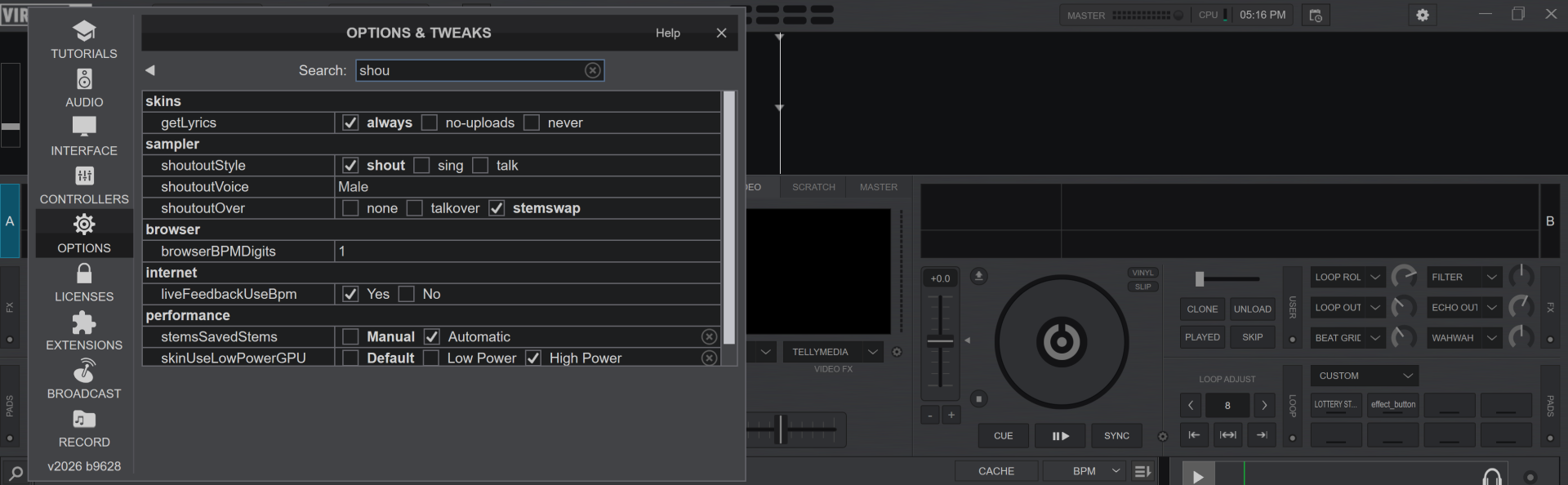
I can see it in the settings, just not the skin.
Posted 4 days ago @ 12:41 am
 locoDog
that's not the internal default skin
Posted 4 days ago @ 1:45 am
 groovindj
Hmmm, I just added the code (copied and pasted from default) into my skin and I'm only getting the button, with no icon.
[EDIT] OK I got it - gfx-pro.png was updated.
[EDIT] OK I got it - gfx-pro.png was updated.
Posted 3 days ago @ 9:07 am
Kingsley Dade
What is the default skin?
Posted 19 hours ago
DjKrazyIan
user32508733 wrote :
What is the default skin?
Lol, your saying that almost like the answer.... didn't actually offer any substance, value, or assistance.
(In a hushed whisper)
It's a secret they don't want everyone to know.
Posted 13 hours ago
DjKrazyIan
Kingsley Dade wrote :
What is the default skin?
A helpful answer might have looked like this:
Click on Settings, click on Layout. Click on any of the skins marked "default"
It may be possible you selected or edited a skin in the past and do not know, since it is only slightly "not default".
You should then see the shout-out icon next to the Master meter up top.
Hope this helps, but please don't tell everyone if this gets out.... IDK what would/could happen....
Posted 13 hours ago
DjKrazyIan
If it helps anyone this is all I found "IN" all the files in and under the folder /VirtualDJ and subFolders that have the word "shoutout" in the file:
NOW you do NOT have to use the default SKIN/layout
Right-click a pad and make a custom button.
Label: SSSH short for "Super Secret ShoutOut Hidden Button
Push Action: shout-out
Exit out, and now when you push your SSSH button, the Shout-Out window will pop up on your NON-Default skin/layout.
Feel free to use any label you want... LOL, but SSSH just feels right for some reason.
changelog txt

"VDJ:BUILD 9628:
-- IMPORTANT --

VIRTUALDJ 2026 Part 3

LINE 6  - Shoutout AI: generate voiceover or replace lyrics on the fly"

LINE 13 - ShoutOut


settings xml

LINE 318 -  <shoutoutStyle modified="yes">talk</shoutoutStyle>
LINE 319 - <shoutoutVoice modified="yes">F12</shoutoutVoice>
LINE 320 - <shoutoutOver>stemswap</shoutoutOver>
NOW you do NOT have to use the default SKIN/layout
Right-click a pad and make a custom button.
Label: SSSH short for "Super Secret ShoutOut Hidden Button
Push Action: shout-out
Exit out, and now when you push your SSSH button, the Shout-Out window will pop up on your NON-Default skin/layout.
Feel free to use any label you want... LOL, but SSSH just feels right for some reason.
Posted 12 hours ago