


 twaga
twaga
I'd like to display the current automix track number together with the song title.
For example,
5/234 - Artist - Title
(where 5 is the current track and 234 is the total number of tracks in the automix playlist.)
Does anyone know a way to achieve this?
For example,
5/234 - Artist - Title
(where 5 is the current track and 234 is the total number of tracks in the automix playlist.)
Does anyone know a way to achieve this?
Posted Sun 19 Jul 26 @ 3:01 pm
 PhantomDeejay
I don't think that's possible at the moment.
Maybe post it on feature requests forum.
PS:
It's not currently possible because:
a) Automix can be set to remove played tracks. This means that the playing track would always be 1/264, 1/263, 1/262 e.t.c.
b) Automix can shuffle playback position within the playlist. This means that the playing track would be 12/264, 117/264, 6/264 e.t.c
Or even worse, with those two settings combined:
120/264, 17/263, 56/262, 4/261 e.t.c.
Therefore a new "action/verb" is needed that will take all of the above into account.
Maybe post it on feature requests forum.
PS:
It's not currently possible because:
a) Automix can be set to remove played tracks. This means that the playing track would always be 1/264, 1/263, 1/262 e.t.c.
b) Automix can shuffle playback position within the playlist. This means that the playing track would be 12/264, 117/264, 6/264 e.t.c
Or even worse, with those two settings combined:
120/264, 17/263, 56/262, 4/261 e.t.c.
Therefore a new "action/verb" is needed that will take all of the above into account.
Posted Wed 22 Jul 26 @ 9:11 am
twaga
It seems like VDJScript has get_automix_position, so I think it's technically possible.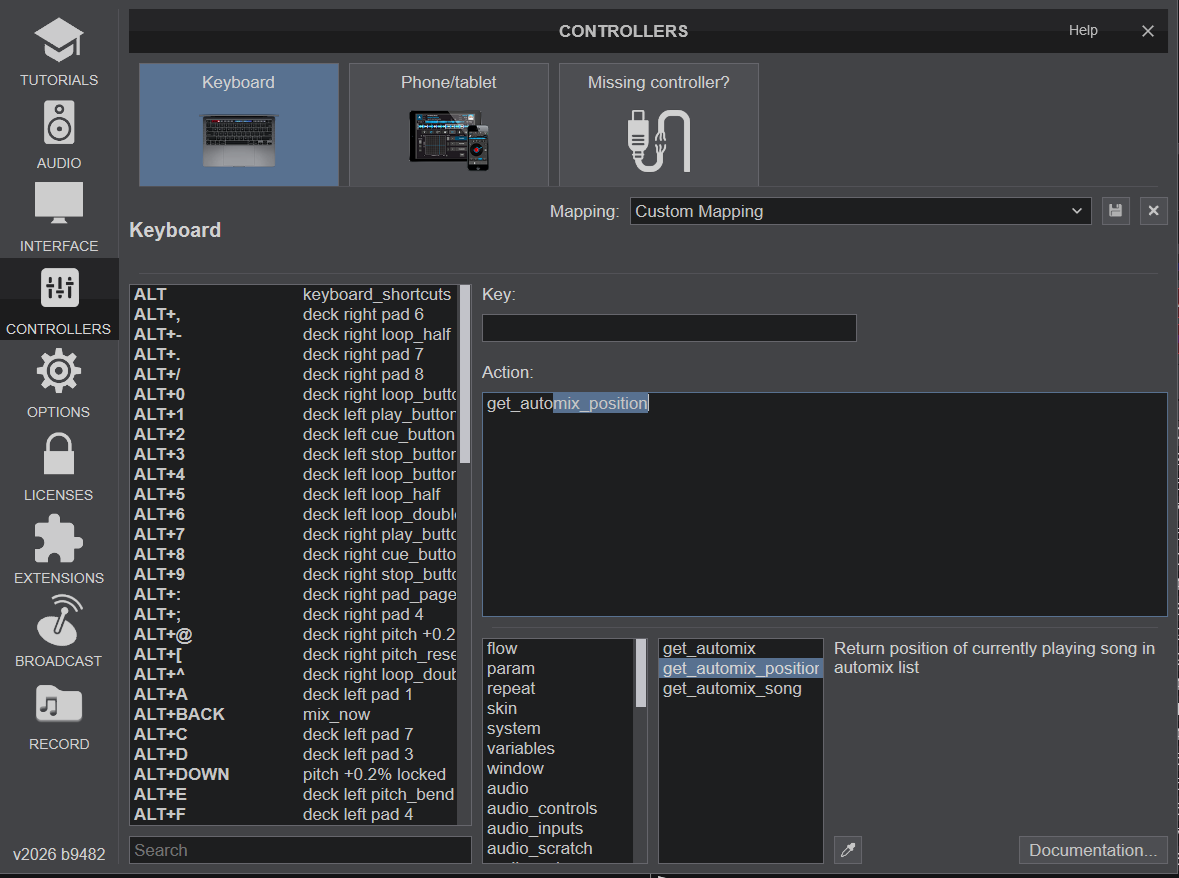
Posted Wed 22 Jul 26 @ 9:18 am
 locoDog
If you run automix sequentially and don't auto remove played entries then yes you could use that with another bit of script
get_text "Automix playing `get_automix_position`/`file_count automix`: `get_automix_song artist 0` - `get_automix_song title 0`"
get_text "Automix playing `get_automix_position`/`file_count automix`: `get_automix_song artist 0` - `get_automix_song title 0`"
Posted Wed 22 Jul 26 @ 9:56 am
PhantomDeejay
Yes, if it's a private skin and you only use automix sequentially without auto-removing tracks, what Locod said above will work.
But if you plan to release the skin to the public (and therefore you can't control how the users will use automix) a better solution is needed.
But if you plan to release the skin to the public (and therefore you can't control how the users will use automix) a better solution is needed.
Posted Wed 22 Jul 26 @ 10:27 am
twaga
I understand that the script suggested by locoDog can retrieve the value I'm looking for. However, what I'd really like to know is how to display that value on screen.
Is there a way to output the result directly to the display, or is it possible to embed this script command inside the skin file?
Is there a way to output the result directly to the display, or is it possible to embed this script command inside the skin file?
Posted Wed 22 Jul 26 @ 3:00 pm
locoDog
sure as a <textzone><text action=""/></textzone>
Where you place it is another question.
Where you place it is another question.
Posted Wed 22 Jul 26 @ 3:06 pm
twaga
It seems that when using the action attribute, the display is only updated after clicking that specific area. So I'll try using the format attribute instead and see if that works better.
https://virtualdj.com/wiki/Skin%20SDK%20Textzone.html
The format is a string that describes how the text will be displayed. You can still use a VDJ Script action with backward single quotes `` for example format="`get sample_slot_name X`" which displays the name of the sample in slot X, or you can use one of the special textzone commands:
Thank you very much!
https://virtualdj.com/wiki/Skin%20SDK%20Textzone.html
The format is a string that describes how the text will be displayed. You can still use a VDJ Script action with backward single quotes `` for example format="`get sample_slot_name X`" which displays the name of the sample in slot X, or you can use one of the special textzone commands:
Thank you very much!
Posted Thu 23 Jul 26 @ 3:33 am
locoDog
twaga wrote :
It seems that when using the action attribute, the display is only updated after clicking that specific area.
Sounds like you're using action that's an attribute of textzone
as in
<textzone action=""/>
I mean as an attribute of the child element text as in
<textzone>
	<text action=""/>
</textzone>
Posted Thu 23 Jul 26 @ 7:24 am
twaga
As LOCODOG suggested, I wrote action="get_automix_position". After testing, I found that this script only works when Automix is actually running after clicking Start Automix. It does not display anything when I manually DJ mix tracks from the Automix playlist.
It is possible to retrieve and display the track's order number in the automix playlist using get_browsed_song 'order'. However, this only refers to the track currently selected in the browser's Automix list, not the track that is actually being played through the master output.
It is possible to retrieve and display the track's order number in the automix playlist using get_browsed_song 'order'. However, this only refers to the track currently selected in the browser's Automix list, not the track that is actually being played through the master output.
Posted Fri 24 Jul 26 @ 3:10 pm
locoDog
tricky to do, you need to use something similar but different with another part, and have to cheat a bit.
in the skin bit
onsongload script
it could be done without cheating but the script would be difficult and long.
in the skin bit
get_text "Playing `get_var $counter`/`file_count automix`: `deck master get_loaded_song artist` - `deck master get_loaded_song title`"
onsongload script
repeat_start trackCounter 1000ms -1 & masterdeck ? repeat_stop trackCounter & set $counter +1 & set $counter `get_var $counter & param_cast int` :
it could be done without cheating but the script would be difficult and long.
Posted Fri 24 Jul 26 @ 4:13 pm
twaga
Thanks for the example. Could you please explain the meaning of the onsongload script below, which appears to be used to control the value of $counter?
> repeat_start trackCounter 1000ms -1 & masterdeck ? repeat_stop trackCounter & set $counter +1 & set $counter `get_var $counter & param_cast int` :
> repeat_start trackCounter 1000ms -1 & masterdeck ? repeat_stop trackCounter & set $counter +1 & set $counter `get_var $counter & param_cast int` :
Posted Fri 24 Jul 26 @ 4:36 pm
locoDog
As we're not actually using automix actively, we've seen
`get_automix_position`
will not work
our onsongload script starts a repeating script that once a second tests "is this loaded deck the masterdeck?" when this case is true the loaded deck has been mixed in,
we can stop the repeating script from repeating and increase the "faked"[guessed, assumed] automix_position counter by 1
`get_automix_position`
will not work
our onsongload script starts a repeating script that once a second tests "is this loaded deck the masterdeck?" when this case is true the loaded deck has been mixed in,
we can stop the repeating script from repeating and increase the "faked"[guessed, assumed] automix_position counter by 1
Posted Fri 24 Jul 26 @ 4:49 pm
twaga
Thanks for the explanation. It seems a bit tricky, and I wonder whether relying on repeat_start polling might introduce some additional CPU overhead.
When the recordWriteCueFile config option is set to Yes, VirtualDJ can create a CUE entry whenever the playing track changes during recording. This suggests that VirtualDJ already detects track changes internally. Isn't there any VDJScript event that is triggered when the master track changes?
When the recordWriteCueFile config option is set to Yes, VirtualDJ can create a CUE entry whenever the playing track changes during recording. This suggests that VirtualDJ already detects track changes internally. Isn't there any VDJScript event that is triggered when the master track changes?
Posted Fri 24 Jul 26 @ 5:03 pm
locoDog
once a second is nothing, like spitting in the sea increases sea levels.
script adds virtually nothing to CPU load,
I've run MANY 30ms repeat scripts concurrently with no cpu increase worth thinking about, the problem I found is with many and really fast, sometimes a repeat may miss and that only matters for time critical stuff.
Think about the skin and how many queries that makes for every frame drawn, sat idle vdj is performing 1000's of queries a second and doing it at very little cpu cost.
script adds virtually nothing to CPU load,
I've run MANY 30ms repeat scripts concurrently with no cpu increase worth thinking about, the problem I found is with many and really fast, sometimes a repeat may miss and that only matters for time critical stuff.
Think about the skin and how many queries that makes for every frame drawn, sat idle vdj is performing 1000's of queries a second and doing it at very little cpu cost.
Posted Fri 24 Jul 26 @ 5:21 pm
twaga
Where should the onSongLoad script be written?
I can't figure out how to access the location where it should be entered.
Is there a place for it inside the skin file, or should it be added somewhere else?
If possible, could you explain where and how to set it up?
I can't figure out how to access the location where it should be entered.
Is there a place for it inside the skin file, or should it be added somewhere else?
If possible, could you explain where and how to set it up?
Posted Sat 25 Jul 26 @ 12:48 pm
locoDog
keyboard mapping holds onsongload
Posted Sat 25 Jul 26 @ 1:03 pm
twaga
I applied the onsongload script you suggested, and I was able to confirm that it works with the following code in the skin file:
<text size="50" color="themecolor" weight="" action="get_var $counter"/>
However, when I try to use the same approach inside the action attribute like below:
<text size="50" color="themecolor" weight="" action="get_text "Playing `get_var $counter`/`file_count automix`: `deck master get_loaded_song artist` - `deck master get_loaded_song title`""/>
This results in nested double quotes inside the action attribute, which causes a parsing error.
Do you know the correct way to handle quotation marks in this situation? Is there an escape sequence or an alternative syntax that should be used inside a skin XML action attribute?
Any help would be greatly appreciated.
<text size="50" color="themecolor" weight="" action="get_var $counter"/>
However, when I try to use the same approach inside the action attribute like below:
<text size="50" color="themecolor" weight="" action="get_text "Playing `get_var $counter`/`file_count automix`: `deck master get_loaded_song artist` - `deck master get_loaded_song title`""/>
This results in nested double quotes inside the action attribute, which causes a parsing error.
Do you know the correct way to handle quotation marks in this situation? Is there an escape sequence or an alternative syntax that should be used inside a skin XML action attribute?
Any help would be greatly appreciated.
Posted Sun 26 Jul 26 @ 9:19 am
locoDog
escape the double quote marks to "
Posted Sun 26 Jul 26 @ 9:22 am
locoDog
BUILD 9583 (2026-08-03)
-get_automix_position also works when automix is not active
-get_automix_position also works when automix is not active
Posted Mon 03 Aug 26 @ 6:53 pm