


 Mobile Zombie
As far as I understand, when doing a CDJ export, VDJ creates both Rekordbox types, both the old and the new one for maximum compliance with different models of CDJ/XDJ.
This weekend I prepared USB sticks with CDJ export as I often do every weekend, and this time I had issues playing some of the tracks in my XDJ-AZ.
Some track said "E 8305 format not supported" and some tracks had noise and glitches in the audio.
They played perfectly in my XDJ-RX3 though.
I always use "CDJ2000" compabilty option when doing the export.
Any clue what I should do or check?
This weekend I prepared USB sticks with CDJ export as I often do every weekend, and this time I had issues playing some of the tracks in my XDJ-AZ.
Some track said "E 8305 format not supported" and some tracks had noise and glitches in the audio.
They played perfectly in my XDJ-RX3 though.
I always use "CDJ2000" compabilty option when doing the export.
Any clue what I should do or check?
Posted Mon 29 Jun 26 @ 11:04 am
 PhantomDeejay
We are currently fine-tuning the CDJ Export for the new "One Library" format.
While you should not have any issues in general, if it's possible to identify which songs displayed that message or had audio glitches, then you could send us the audio files to check them as well.
PS: The error message is missleading BTW. XDJ could throw "Unsupported format" error even because it doesn't like the time of a hotcue :P
That's why your drive worked fine on XDJ-RX3 (older library format) and not on XDJ-AZ.
There's nothing wrong with the files themselves.
While you should not have any issues in general, if it's possible to identify which songs displayed that message or had audio glitches, then you could send us the audio files to check them as well.
PS: The error message is missleading BTW. XDJ could throw "Unsupported format" error even because it doesn't like the time of a hotcue :P
That's why your drive worked fine on XDJ-RX3 (older library format) and not on XDJ-AZ.
There's nothing wrong with the files themselves.
Posted Mon 29 Jun 26 @ 11:28 am
 djdad
djdad
We also invite you to try with the latest Early Access* Build 9482, as similar issues have been already fixed.
*You can enable EarlyAccessUpdates from Settings and restart VDJ to auto-update.
If still there with Early Access, then please follow what Phantom suggested and send us a few of those Tracks that fail to propelry get exported and fail to load on CDJ/XDJ
*You can enable EarlyAccessUpdates from Settings and restart VDJ to auto-update.
If still there with Early Access, then please follow what Phantom suggested and send us a few of those Tracks that fail to propelry get exported and fail to load on CDJ/XDJ
Posted Mon 29 Jun 26 @ 11:53 am
Mobile Zombie
Thanks both of you for responding. I appreciate your hard work on this brilliant software.
Just a question, my normal workflow is that I use lists which I export one by one to the USB stick with CDJ export function.
Is there a way to export several lists as one task in VDJ? Or have a folder with lists that should be included on the USB stick so I better can keep track of the available content.
Just a question, my normal workflow is that I use lists which I export one by one to the USB stick with CDJ export function.
Is there a way to export several lists as one task in VDJ? Or have a folder with lists that should be included on the USB stick so I better can keep track of the available content.
Posted Wed 01 Jul 26 @ 6:59 am
PhantomDeejay
You can export a list (red folder) with all it's sublists (sub red folders) at the same time.
That's as far as it gets the way "One Library" is designed to work I'm afraid..
You see Pioneer / AlphaTheta workflow relies very heavily on playlists, and their entire ecosystem is built around that.
That's as far as it gets the way "One Library" is designed to work I'm afraid..
You see Pioneer / AlphaTheta workflow relies very heavily on playlists, and their entire ecosystem is built around that.
Posted Wed 01 Jul 26 @ 7:09 pm
Mobile Zombie
If I use build 9482 and update already created lists on my usb stick with, for example add a few tracks.
Will VDJ update the database for all the files existing on the stick, based on your latest work and fixes for adding support for library one?
Or how do I need to make use of your fixes? Do I need to export everything again to a blank usb stick?
Will VDJ update the database for all the files existing on the stick, based on your latest work and fixes for adding support for library one?
Or how do I need to make use of your fixes? Do I need to export everything again to a blank usb stick?
Posted Wed 08 Jul 26 @ 9:09 am
 Adion
Adion
Tracks without changes won't be modified, best to remove the list and tracks from the USB and export again
Posted Wed 08 Jul 26 @ 11:58 am
Mobile Zombie
Updated to 9482 and the problem is still there.
I had one track that was sounding horrible the first 15 seconds after export and played in XDJ-AZ
Do you want to me send that specific track to you?
Problem is the file plays just fine on the Mac. So the file itself seems to be ok.
I also tried to load the track again on the AZ, then the track had not the same kind of glitches as when in the first try.
I had one track that was sounding horrible the first 15 seconds after export and played in XDJ-AZ
Do you want to me send that specific track to you?
Problem is the file plays just fine on the Mac. So the file itself seems to be ok.
I also tried to load the track again on the AZ, then the track had not the same kind of glitches as when in the first try.
Posted Fri 10 Jul 26 @ 7:27 am
Adion
Sure
Posted Fri 10 Jul 26 @ 8:27 am
Mobile Zombie
Thanks Adion, but is it enough with only the file itself? Since it plays well on the mac and also on my RX3 which uses the old database.
Would I be able somehow to send both the file and the database?
Just a thought. Can it have something to do with having fluid grid active when doing the Cdj export?
Would I be able somehow to send both the file and the database?
Just a thought. Can it have something to do with having fluid grid active when doing the Cdj export?
Posted Sun 12 Jul 26 @ 12:39 pm
Adion
Just the file should be fine, we can export and try here :)
Posted Sun 12 Jul 26 @ 1:43 pm
Mobile Zombie
Any updates regarding the "one library" CDJ export issues I found?
Posted Mon 20 Jul 26 @ 7:43 am
Adion
We did not get any distortion, only thing missing is remaining time display. We will try to fix for next update though
Posted Tue 21 Jul 26 @ 11:18 am
Mobile Zombie
Very strange. Do you want me to record the audio when playing that particular track in the AZ ?
Posted Tue 21 Jul 26 @ 12:44 pm
PhantomDeejay
I tried myself to export the track you sent us and play it on our own XDJ-AZ. I could not hear any distortion.
I don't think a recording will be of any particular help, but sure, be free to record and send me the result, just to compare what you hear vs. what I hear.
Also if there's anything "special" that makes this track prone to distortion, let me know (e.g. distortion gets higher when tempo adjustment is more than +4% with MT on - just saying..)
Thanks!
Edit:
BTW, which firmware version is your XDJ-AZ running ? I'm running the latest version v1.30
I don't think a recording will be of any particular help, but sure, be free to record and send me the result, just to compare what you hear vs. what I hear.
Also if there's anything "special" that makes this track prone to distortion, let me know (e.g. distortion gets higher when tempo adjustment is more than +4% with MT on - just saying..)
Thanks!
Edit:
BTW, which firmware version is your XDJ-AZ running ? I'm running the latest version v1.30
Posted Tue 21 Jul 26 @ 1:32 pm
Mobile Zombie
We are not actually talking about distortion. The track is completely ruined.
It seems though the waveform graphics doesn’t include the ”garbage”
I am running firmware 1.30 on the AZ
I have had ZERO issues using cdj export with my RX3 whatsoever.
As soon as I switched to AZ the problems began.
Mailed the recording of the same track when played on my AZ.
It seems though the waveform graphics doesn’t include the ”garbage”
I am running firmware 1.30 on the AZ
I have had ZERO issues using cdj export with my RX3 whatsoever.
As soon as I switched to AZ the problems began.
Mailed the recording of the same track when played on my AZ.
Posted Tue 21 Jul 26 @ 2:49 pm
Mobile Zombie
Adion or George, I saw the latest 9582 build has a fix for CDJ export vid VBR mp3.
Is this related to the issue I found?
Is this related to the issue I found?
Posted Wed 12 Aug 26 @ 8:52 am
Adion
Give it a try, it should indeed also help for your issue
Posted Wed 12 Aug 26 @ 8:54 am
Mobile Zombie
Would it be possible to add a function in CDJ export options to make USB stick "refreshed" with new export on all included files on stick in case there is older exports that failed in some way?
I know removing everything on the stick will do the same, but in my case I have lots and lots of playlists on the stick and it would consume a lot of time to add everything back to it again.
I know removing everything on the stick will do the same, but in my case I have lots and lots of playlists on the stick and it would consume a lot of time to add everything back to it again.
Posted Tue 18 Aug 26 @ 11:22 am
 Electronic Green Room
Hi there,
I have a different issue with the CDJ Export and I think, but am not sure, this worked in the past:
I export a Filter-Folder containing a sorting criteria. When inspecting the stick and the exported playlist in Rekordbox the sorting of the songs is all over the place. I can not even tell what sorting criteria is in place.
Here is a screenshot. On the left Rekordbox, showing the result of the export. On the right the source with the sorting criteria.
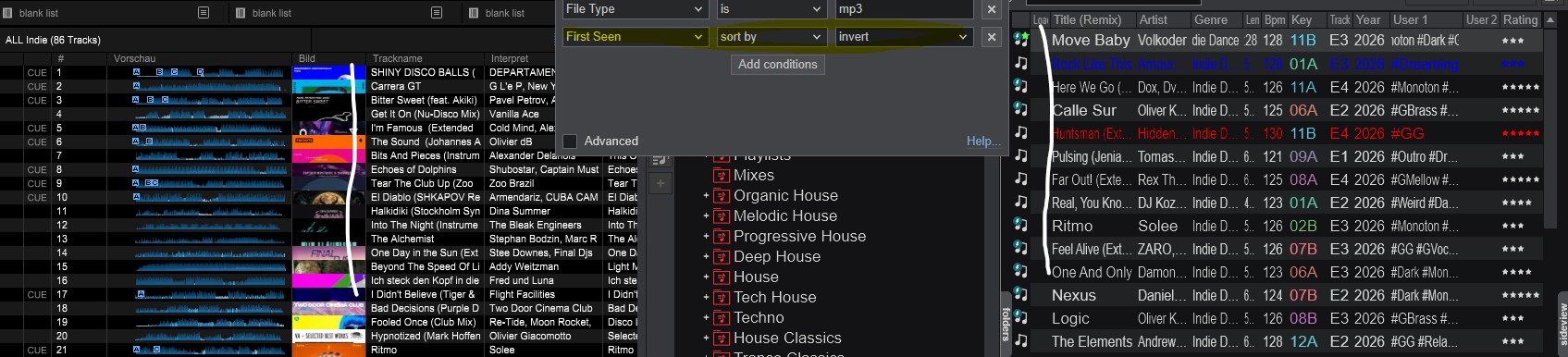
Cheers Jochen
PS: I'm using version b9583 on Windows.
I have a different issue with the CDJ Export and I think, but am not sure, this worked in the past:
I export a Filter-Folder containing a sorting criteria. When inspecting the stick and the exported playlist in Rekordbox the sorting of the songs is all over the place. I can not even tell what sorting criteria is in place.
Here is a screenshot. On the left Rekordbox, showing the result of the export. On the right the source with the sorting criteria.
Cheers Jochen
PS: I'm using version b9583 on Windows.
Posted Sat 22 Aug 26 @ 8:22 am
