


I would love to see a global "Stem Echo Out" option in VirtualDJ, similar to the behavior found in djay Pro (Mute FX)
Currently, stem transitions with Echo Out require using STEMS+FX pads or custom mappings. It would be great to have a simple global setting that can be enabled or disabled.
When enabled:
Muting a stem (Vocals, Melody, Bass, Drums, etc.) automatically performs a short Echo Out transition before the stem is removed.
Unmuting a stem behaves normally.
This would make stem performance feel smoother and more musical, so much simpler, especially for live remixing and controller workflows
Thank you for considering this feature.
Currently, stem transitions with Echo Out require using STEMS+FX pads or custom mappings. It would be great to have a simple global setting that can be enabled or disabled.
When enabled:
Muting a stem (Vocals, Melody, Bass, Drums, etc.) automatically performs a short Echo Out transition before the stem is removed.
Unmuting a stem behaves normally.
This would make stem performance feel smoother and more musical, so much simpler, especially for live remixing and controller workflows
Thank you for considering this feature.
Posted Thu 04 Jun 26 @ 8:48 pm
 wickedmix
there are several different pads you can add on that do this
look here https://virtualdj.com/plugins/?category=pads
look here https://virtualdj.com/plugins/?category=pads
Posted Thu 04 Jun 26 @ 10:18 pm
 DJ VinylTouch
Outside of custom mapping, this is partially doable with Echo Out for a specific selected stem on a deck's effects:
https://virtualdj.com/manuals/virtualdj/interface/decks/decksadvanced/effects.html
Or with regular Echo and fxProcessing = Post Fader and using the Stems pad, while selecting a specific stem part to apply it on before enablng the effect (that should work for all post fader allowed effects).
It won't work with auto apply with a stem part removal though with the default Stems+FX pad mode without a mapping change (I think I reported something similar for the S11 (smooth echo use) a while ago but this is more generalized here).
https://virtualdj.com/manuals/virtualdj/interface/decks/decksadvanced/effects.html
Or with regular Echo and fxProcessing = Post Fader and using the Stems pad, while selecting a specific stem part to apply it on before enablng the effect (that should work for all post fader allowed effects).
It won't work with auto apply with a stem part removal though with the default Stems+FX pad mode without a mapping change (I think I reported something similar for the S11 (smooth echo use) a while ago but this is more generalized here).
Posted Thu 04 Jun 26 @ 10:20 pm
Yes, I've already mapped FX Select and Echo Out to specific stem parts, but it's a real pain to use.
For example, if I want to Echo Out the Vocal, Instruments, and Bass at different points in a mix, I currently have to do the following:
**Vocal:**
1. Select FX Send to Vocal
2. Press Echo Out
3. Mute Vocal (I have to mute it before selecting another stem, otherwise the next selected stem will be muted instantly with no Echo Out )
4. Deactivate Echo Out
5. Deselect FX send from Vocal
**Now Instruments:**
1. Select FX Send to Instruments
2. Press Echo Out
3. Mute Instruments
4. Deactivate Echo Out
5. Deselect FX send from Instru
**Bass:**
1. Select FX Send to Bass
2. Press Echo Out
That’s 12 button presses just to Echo Out 3 stem parts individually.
I often mess up during gigs which gets really frustrating in a live situation.
For example, if I want to Echo Out the Vocal, Instruments, and Bass at different points in a mix, I currently have to do the following:
**Vocal:**
1. Select FX Send to Vocal
2. Press Echo Out
3. Mute Vocal (I have to mute it before selecting another stem, otherwise the next selected stem will be muted instantly with no Echo Out )
4. Deactivate Echo Out
5. Deselect FX send from Vocal
**Now Instruments:**
1. Select FX Send to Instruments
2. Press Echo Out
3. Mute Instruments
4. Deactivate Echo Out
5. Deselect FX send from Instru
**Bass:**
1. Select FX Send to Bass
2. Press Echo Out
That’s 12 button presses just to Echo Out 3 stem parts individually.
I often mess up during gigs which gets really frustrating in a live situation.
Posted Thu 04 Jun 26 @ 10:53 pm
DJ VinylTouch
No worries - it's a reasonable request...we just try to find workarounds to get DJs going as best and as fast as we can - it's up to the devs to decide the rest.
Posted Fri 05 Jun 26 @ 2:02 am
 locoDog
3 buttons would do it, one already exists but will need minor changes effect_stems
One button just turns this mode on|off
main button
if mode off ? something else :
if echo out off ? echo out on : detect effect_stem type and mute that stem then turn echo out off
pad page would be even easier.
One button just turns this mode on|off
main button
if mode off ? something else :
if echo out off ? echo out on : detect effect_stem type and mute that stem then turn echo out off
pad page would be even easier.
Posted Fri 05 Jun 26 @ 4:01 am
 groovindj
I'd guess It could even be set as a sequence on one button, so it steps through vocal, instruments, bass (apply them go to the next one).....
Posted Fri 05 Jun 26 @ 8:12 am
locoDog
a bit restrictive on the order, might get a bit tired after a while.
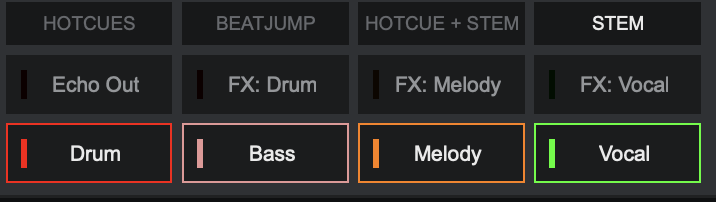
padpage like shown in the pic, I'd reinstate effect_stems bass, get rid of the echo out button then make padshift 1-4 each effect_stem on & have a echo out call with conditions,
slight duplication of buttons but keeps it simple when you might have had a beer or 3.
Most of these 'global' features in other SW mostly boil down to a script somebody else wrote for you, nothing actually new in result, just a smarter way to do things.
That said stem driven ducking echo would be a nice effect, I asked for that back in Jan this year, suggested too late for the fx revamp of 2026 :(
padpage like shown in the pic, I'd reinstate effect_stems bass, get rid of the echo out button then make padshift 1-4 each effect_stem on & have a echo out call with conditions,
slight duplication of buttons but keeps it simple when you might have had a beer or 3.
Most of these 'global' features in other SW mostly boil down to a script somebody else wrote for you, nothing actually new in result, just a smarter way to do things.
That said stem driven ducking echo would be a nice effect, I asked for that back in Jan this year, suggested too late for the fx revamp of 2026 :(
Posted Fri 05 Jun 26 @ 9:33 am