


 damiangoch
how to set the gain so that it doesn't change when I switch tracks thanks for the reply
Posted 6 days ago @ 6:55 pm
 DjKaos2012
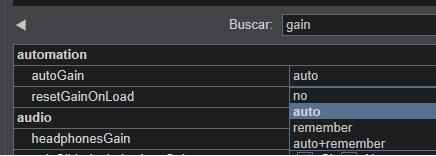
You have 3 modes, choose the one you consider convenient
AUTO
VirtualDJ analyzes the track and sets the gain automatically.
The goal is to make loud and quiet songs feel more balanced during a mix.
Really useful when mixing music from different years, genres, or sources where volume levels vary a lot.
REMEMBER
Works together with AUTO.
If you manually change the gain on a song, VirtualDJ remembers that adjustment for the future.
Example:
a track sounds too loud,
you lower the gain by -2 dB,
next time you load that same track, VirtualDJ will apply your saved setting automatically.
Manual
You control the deck gain completely by yourself.
VirtualDJ will not make automatic corrections.
Best for DJs who prefer full manual control over their levels.
Posted 5 days ago @ 4:23 pm