


 lakis69
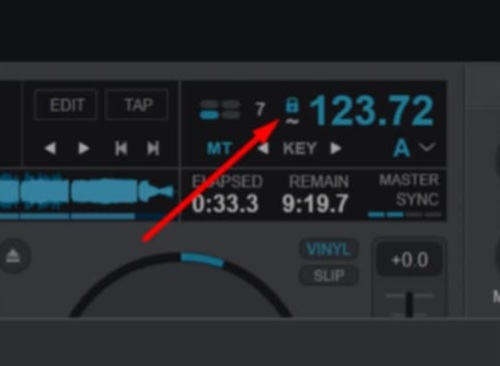
one last question... when I add a song to the deck... and I activate the lock... when I add it back to the deck it deactivates and wants me to press it again... is there an option to keep it in memory so I don't have to press the lock every time I put the song on the deck?
Posted Fri 03 Apr 26 @ 9:38 am
 groovindj
I don't think there is (at this moment) although you could manually add it in the POI Editor.
People have already requested an option to export a track that's been stabilized, so an option to "save as stable" just for use within VDJ would be a good addition.
People have already requested an option to export a track that's been stabilized, so an option to "save as stable" just for use within VDJ would be a good addition.
Posted Fri 03 Apr 26 @ 9:50 am
lakis69
groovindj wrote :
I don't think there is (at this moment) although you could manually add it in the POI Editor.
People have already requested an option to export a track that's been stabilized, so an option to "save as stable" just for use within VDJ would be a good addition.
People have already requested an option to export a track that's been stabilized, so an option to "save as stable" just for use within VDJ would be a good addition.
OK thanks 😊😊
Posted Fri 03 Apr 26 @ 9:52 am
 IIDEEJAYII
lakis69 wrote :
one last question... when I add a song to the deck... and I activate the lock... when I add it back to the deck it deactivates and wants me to press it again... is there an option to keep it in memory so I don't have to press the lock every time I put the song on the deck?
anything that syncs the track will also, enable the "LOCK" for a fluid track
So smartPlay would automatically "LOCK" the fluid track.
And that may not be the best, as that will lock the entire track to the BPM of the start of track, which may not be best if there are large variations in BPM in the Track, from the initial BPM.
(without the track locked, one can see the BPMs displayed on the deck's platter as one plays the track, locking at any of those BPMs will adjust the entire track to that BPM that at that position, it is pressed/locked)
One can "LOCK" (UNLOCK), the BPM of entire track and not have the grids synced, with the script bpm_stabilizer in a custom button.
SYNC button will do BOTH, align the CBG and also "LOCK" the BPM (turn on bpm_stablizer) for a Fluid Gridded track.
OR and any time the entire BPM of the fluid track can be LOCKED the current BPM (with the bpm_stablizer custom button, and then beat match that as one would any rigid (fixed BPM) track.
(this assumes that the fluid beat gridding, found all the variations, and placed the grids on the beats well)
summary:
wanted to mention, since one can play with maybe when one would wish to have BPM LOCKED.
PS
If you always want something to happen when you load a track, script that in ONSONGLOAD.
Posted Fri 03 Apr 26 @ 10:15 am
lakis69
IIDEEJAYII wrote :
anything that syncs the track will also, enable the "LOCK" for a fluid track
So smartPlay would automatically "LOCK" the fluid track.
And that may not be the best, as that will lock the entire track to the BPM of the start of track, which may not be best if there are large variations in BPM in the Track, from the initial BPM.
(without the track locked, one can see the BPMs displayed on the deck's platter as one plays the track, locking at any of those BPMs will adjust the entire track to that BPM that at that position, it is pressed/locked)
One can "LOCK" (UNLOCK), the BPM of entire track and not have the grids synced, with the script bpm_stabilizer in a custom button.
SYNC button will do BOTH, align the CBG and also "LOCK" the BPM (turn on bpm_stablizer) for a Fluid Gridded track.
wanted to mention, since one can play with maybe when one would wish to have BPM LOCKED.
PS
If you always want something to happen when you load a track, script that in ONSONGLOAD.
lakis69 wrote :
one last question... when I add a song to the deck... and I activate the lock... when I add it back to the deck it deactivates and wants me to press it again... is there an option to keep it in memory so I don't have to press the lock every time I put the song on the deck?
anything that syncs the track will also, enable the "LOCK" for a fluid track
So smartPlay would automatically "LOCK" the fluid track.
And that may not be the best, as that will lock the entire track to the BPM of the start of track, which may not be best if there are large variations in BPM in the Track, from the initial BPM.
(without the track locked, one can see the BPMs displayed on the deck's platter as one plays the track, locking at any of those BPMs will adjust the entire track to that BPM that at that position, it is pressed/locked)
One can "LOCK" (UNLOCK), the BPM of entire track and not have the grids synced, with the script bpm_stabilizer in a custom button.
SYNC button will do BOTH, align the CBG and also "LOCK" the BPM (turn on bpm_stablizer) for a Fluid Gridded track.
wanted to mention, since one can play with maybe when one would wish to have BPM LOCKED.
PS
If you always want something to happen when you load a track, script that in ONSONGLOAD.
thanks... i will try to figure it out 😊😊
Posted Fri 03 Apr 26 @ 10:21 am
IIDEEJAYII
Additionally:
wanted to mention, the custom button bpm_stablizer, is not really necessary, since the "LOCK" icon, is that same button, that turns bpm_stablizer on/off, when clicked.
wanted to mention, the custom button bpm_stablizer, is not really necessary, since the "LOCK" icon, is that same button, that turns bpm_stablizer on/off, when clicked.
Posted Fri 03 Apr 26 @ 10:33 am
groovindj
Bear in mind that most VDJ skins do not have the code to display the fluid ~ tilde or the lock, and may never be updated .
It's there in the default skin (of course) but there are hundreds of others.
It's there in the default skin (of course) but there are hundreds of others.
Posted Fri 03 Apr 26 @ 10:36 am
lakis69
some help... where do I put the bpm_stabilizer command in the POI editor? I put it in the first cue but I have to start the song from the cue I want it to be activated with play
Posted Fri 03 Apr 26 @ 4:21 pm
groovindj
I think you can add an onload to the track (but I'm no expert).
Posted Fri 03 Apr 26 @ 4:30 pm
lakis69
since we make the songs manually from the bpm editor... why don't you put a lock there and choose whether we want it to be there permanently or not in every song from there on and I have to activate it constantly from the decks?
and the deck lock should be simple as a reminder that we have the lock active from the bpm editor... I think this would be a good solution and more practical than constantly activating it
and the deck lock should be simple as a reminder that we have the lock active from the bpm editor... I think this would be a good solution and more practical than constantly activating it
Posted Fri 03 Apr 26 @ 5:10 pm
 DJ VinylTouch
This has been suggested. However, your original question has been answered - there is a BPM stabilizer function that can be triggered manually, or automatically (when the track is involved in audible transition), that does what you want (stabilizes the track BPM).
Posted Fri 03 Apr 26 @ 6:39 pm
 PANOSV
DJ VinylTouch wrote :
also an export of a warped track would be awesome!This has been suggested. .
Posted Fri 03 Apr 26 @ 6:52 pm
DJ VinylTouch
All suggested (I actually suggested that myself).
Posted Fri 03 Apr 26 @ 7:06 pm
lakis69
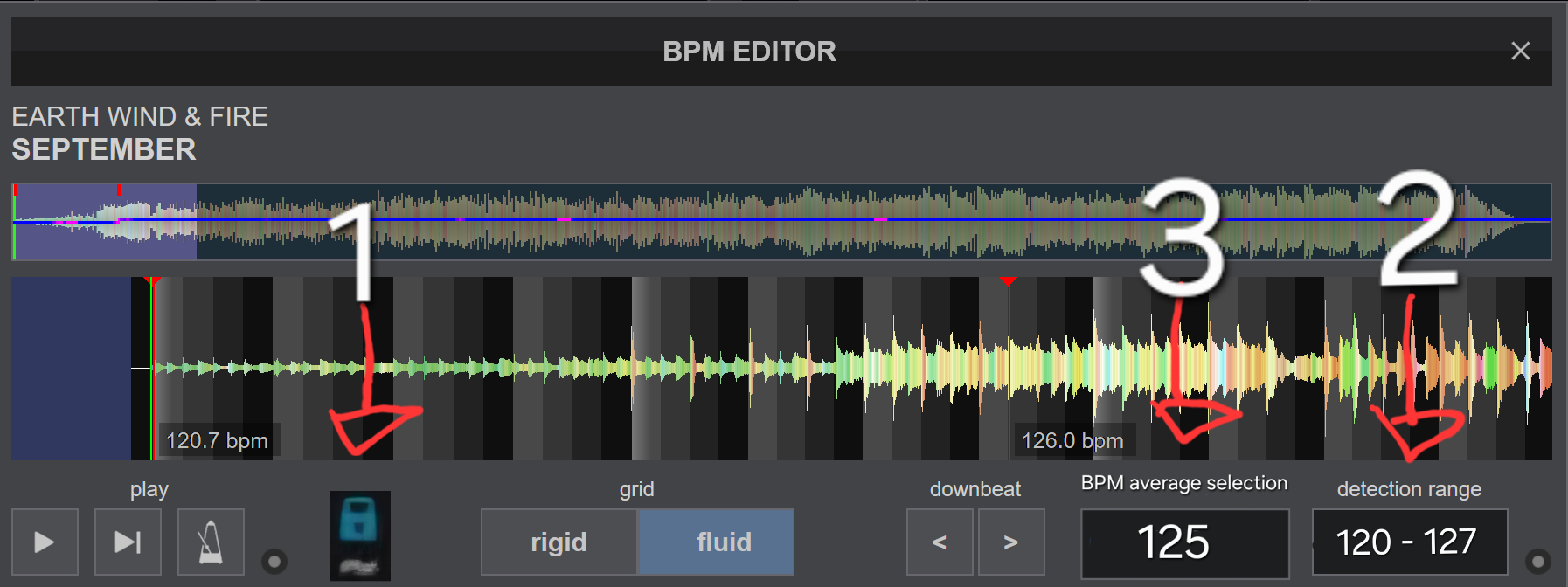
I would suggest an idea... to add an option to the bpm editor where we can choose at what bpm the song should play... for example if a song is 120, then 125, then 121 then 120... to choose at which bpm to lock, for example at 125 permanently and not let the program choose on its own... rekordbox has something similar where you choose on the decks at how many bpm you want all the songs you add to play... to put something similar in vdj but for the bpm editor.
1.permanently locked to each song..
2.song BPM range indicator.
3.average BPM option.
example...
1.permanently locked to each song..
2.song BPM range indicator.
3.average BPM option.
example...
Posted Sun 05 Apr 26 @ 10:22 pm