


 thedjchi
Running Windows 11 25H2 build 26200.8037
CPU i7-12700H, 32 GB RAM, 1 TB storage, NVIDIA RTX 3060
VDJ v2026 b9005
Wasn't having issues until a few weeks ago, I'm not sure if it was due to a driver/software/OS update. I can open VDJ successfully only after a reboot. Then if I try to re-open sometime later, it will hang. I haven't been able to reproduce it consistently.
Steps to reproduce:
- Launch VDJ
- Click anywhere on the screen
- Hangs for a bit, then the "VDJ is not responding" message appears
I can provide logs if needed, though I'm not sure how to do that
CPU i7-12700H, 32 GB RAM, 1 TB storage, NVIDIA RTX 3060
VDJ v2026 b9005
Wasn't having issues until a few weeks ago, I'm not sure if it was due to a driver/software/OS update. I can open VDJ successfully only after a reboot. Then if I try to re-open sometime later, it will hang. I haven't been able to reproduce it consistently.
Steps to reproduce:
- Launch VDJ
- Click anywhere on the screen
- Hangs for a bit, then the "VDJ is not responding" message appears
I can provide logs if needed, though I'm not sure how to do that
Posted 7 days ago @ 4:42 pm
 djcel
djcel
Do you use a controller? If yes which one and does it crash without connected?
Posted 7 days ago @ 5:19 pm
lilstebo
I have this same exact issue for about 2 weeks now . I have been trying everything to fix the issue . And to answer your question, it does happen even if my midi controller isnt connected .. please help
Posted 7 days ago @ 7:17 pm
 djsplitimage
I've been also battling the same error, two different Windows Laptops. I close, it looks gone from my screen however, the screen on my Denon Prime 4+ is still on. I try to reopen VDJ, says it's still open. Kill the process running in the background, go to reopen, program hangs. Restart laptop, I get one good open of the application. if I close and try to reopen, issue happens all over again.
Read something that it has to do with Windows releasing the audio device afterwards, don't know if this is an ASIO driver issue (which is what you get with Denon Prime 4 drivers). I actually can run it just fine if my controller is not connected. it'll open, save changes, close, and reopen with no issue.
Read something that it has to do with Windows releasing the audio device afterwards, don't know if this is an ASIO driver issue (which is what you get with Denon Prime 4 drivers). I actually can run it just fine if my controller is not connected. it'll open, save changes, close, and reopen with no issue.
Posted 7 days ago @ 10:14 pm
Angel Tabares
I Have the same issue, when i email tech support, told me that my system was older, but it was the same computer that have been using for 2 years only, and it was working fine until about 3 weeks ago, it starting crashing, i have a RANE ONE controller and had no issues with an older computer running windows 10, but it is older and sometimes it doesn't have the resources to keep my video and audio ASIO running properly, i just got a brand new computer $ 1,500.00 and after did all of the software and updates it does the same, as i mentioned to the tech, i run video and audio and i dont have a bundle licence to run serato video, the controller came with serato pro licence, but im a loyal customer of VDJ , i hope that you come up with a fast fix.
thank you.
System info
Processor Intel(R) Core(TM) Ultra 9 288V (3.30 GHz)
Installed RAM 32.0 GB (31.6 GB usable)
System type 64-bit operating system, x64-based processor
Angel T.
thank you.
System info
Processor Intel(R) Core(TM) Ultra 9 288V (3.30 GHz)
Installed RAM 32.0 GB (31.6 GB usable)
System type 64-bit operating system, x64-based processor
Angel T.
Posted 7 days ago @ 10:27 pm
James Leone
I’m having the same issue. I’ve updated drivers, along with other troubleshooting (as I am in IT) and ended up reinstalling Windows and connected my Rane Four and it finally worked. I disconnected the controller and then went back into VDJ and it froze again on startup.
Posted 7 days ago @ 1:56 am
Still playing music
Same here, cannot find the link but it has to do with USB. I find that when I fire up soundswitch, it does the same thing. Now the only thing in common for the most part is everything travelling via USB.
Gonna go back and look to see where I saved it and will update all unless somebody else does.
P.S. This only started in the last two weeks as well. It does work fine if I restart windows right away then fire everything up again. It all work amazing as usual up to two weeks or so ago.
Gonna go back and look to see where I saved it and will update all unless somebody else does.
P.S. This only started in the last two weeks as well. It does work fine if I restart windows right away then fire everything up again. It all work amazing as usual up to two weeks or so ago.
Posted 7 days ago @ 4:00 am
djsplitimage
Don't know if this is something but figured someone with a brain bigger than mines could sort this out....ran the scenario through chat GPT and this is part of what it gave me as a response.....
3) Check Windows Update history for the likely culprit
The strongest recent suspects called out in VirtualDJ troubleshooting are:
KB5074105
KB5077241
KB5077181
And one user in the closing-issue thread reported that after uninstalling the Windows update, VirtualDJ started working correctly again.
So check:
Settings → Windows Update → Update history
Look for those KBs, or any update installed right around when this began
If present, uninstall the newest suspect one first
Reboot and retest
Given your timeline, KB5077181 and KB5077241 are especially worth checking. Microsoft confirms both apply to Windows 11 24H2, with KB5077181 released on February 10, 2026 and KB5077241 on February 24, 2026.
Only bad thing is I don't see those updates in my history, but again, could just be because one laptop is new and the other I had for a while but recently reimaged.
3) Check Windows Update history for the likely culprit
The strongest recent suspects called out in VirtualDJ troubleshooting are:
KB5074105
KB5077241
KB5077181
And one user in the closing-issue thread reported that after uninstalling the Windows update, VirtualDJ started working correctly again.
So check:
Settings → Windows Update → Update history
Look for those KBs, or any update installed right around when this began
If present, uninstall the newest suspect one first
Reboot and retest
Given your timeline, KB5077181 and KB5077241 are especially worth checking. Microsoft confirms both apply to Windows 11 24H2, with KB5077181 released on February 10, 2026 and KB5077241 on February 24, 2026.
Only bad thing is I don't see those updates in my history, but again, could just be because one laptop is new and the other I had for a while but recently reimaged.
Posted 6 days ago @ 1:18 pm
djsplitimage
So looks like there's an unofficial solution posted in a different chat.....just tried this myself and it's been working so far, I've been opening & closing VDJ with no issue. The one thing added in a separate post on this thread was to make sure you open up Powershell as an Admin so don't forget that part.
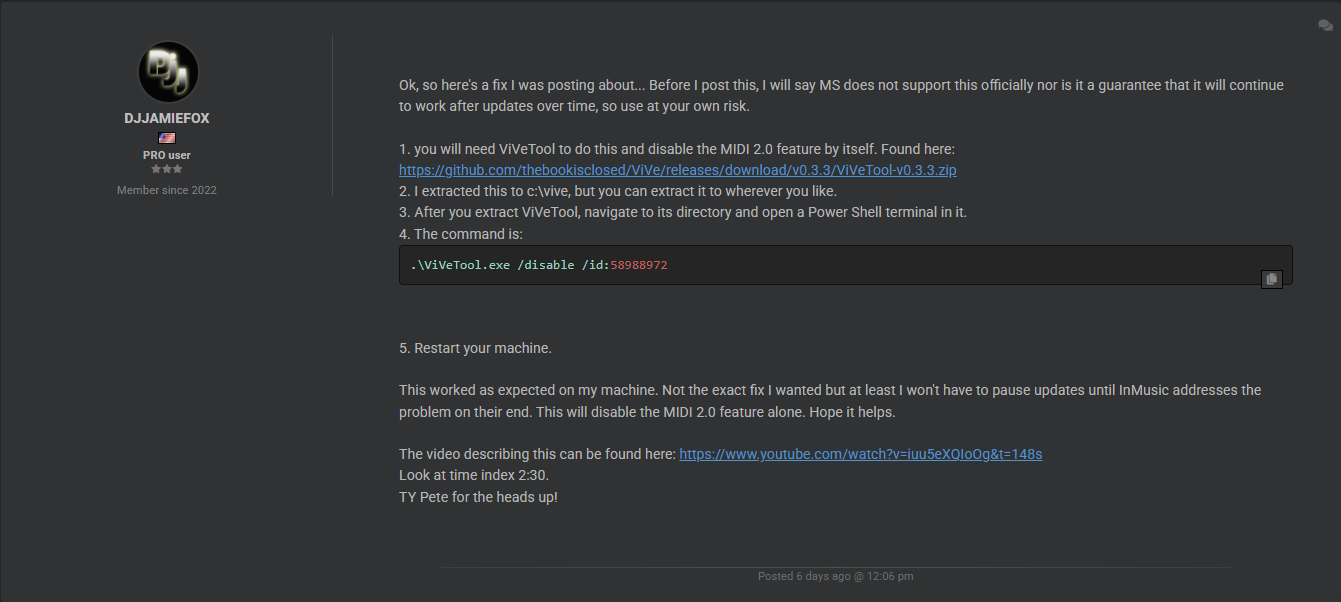
Original thread is here https://virtualdj.com/forums/267934/VirtualDJ_Technical_Support/Recent_Windows_11_(Feb_2026)_Updates_causes_connectivity_issues_with_Rane_controllers..html
Original thread is here https://virtualdj.com/forums/267934/VirtualDJ_Technical_Support/Recent_Windows_11_(Feb_2026)_Updates_causes_connectivity_issues_with_Rane_controllers..html
Posted 6 days ago @ 2:21 pm
Yesty Rodriguez
No me quedo otra opcion que formatear la pc e instalar windows 11 22h2, la que tiene el midi mas estable, ésto me funcionó. instalé dicha version y desactive "windows update"
Posted 6 days ago @ 11:41 pm
djsplitimage
Yesty Rodriguez wrote :
No me quedo otra opcion que formatear la pc e instalar windows 11 22h2, la que tiene el midi mas estable, ésto me funcionó. instalé dicha version y desactive "windows update"
Estoy publicando esto aquí en español con la esperanza de que te ayude. Dicho eso, debo aclarar que Microsoft no respalda esto oficialmente ni garantiza que seguirá funcionando después de futuras actualizaciones, así que úsalo bajo tu propia responsabilidad.
Necesitarás ViVeTool para hacer esto y desactivar la función MIDI 2.0 por sí sola. Se puede encontrar aquí:
https://github.com/thebookisclosed/ViVe/releases/download/v0.3.3/ViVeTool-v0.3.3.zip
Yo lo extraje en C:\vive, pero puedes extraerlo donde prefieras.
Después de extraer ViVeTool, ve a su carpeta y abre una terminal de PowerShell como administrador dentro de ella. Esto es muy importante.
El comando es:
.\ViVeTool.exe /disable /id:58988972
Reinicia tu equipo.
En mi equipo esto funcionó como se esperaba. No es exactamente la solución que quería, pero al menos no tendré que pausar las actualizaciones hasta que InMusic solucione el problema por su lado. Esto desactivará únicamente la función MIDI 2.0. Espero que te sirva.
El video que lo explica se puede encontrar aquí:
https://www.youtube.com/watch?v=iuu5eXQIoOg&t=148s
Mira en la marca de tiempo 2:30.
Posted 5 days ago @ 6:32 pm