


 Marcel mdg
Hi i want to refine the songpos element a little more. I have a few questions about this and refering to the numbers in the attached pictures.
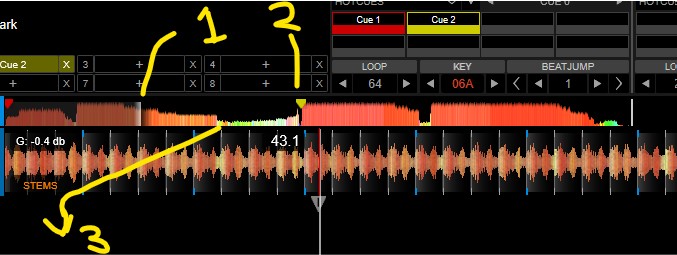
1) Can this slider be changed in thickness of color? (i want it a little whiter and more clear without
shade). If i use colorplayed="no" the area behind the if a little darker. What are the options with this
slider?
2) If have Cue markers in skins (for instance Vanced GT) that are using letters. How can i use these
for cuepoint? and how to place them a little above the waveform? The same question i have for the
original skin. This skin is using are triangle and cue number xxx as marker. I can`t find this in the
XML file.
3) Could also a slider be used under the waveform to see where you are in the waveform?
4) I have seen attribute waveform="yes" in songpos, but can`t find out what it does.
gr. Marcel
1) Can this slider be changed in thickness of color? (i want it a little whiter and more clear without
shade). If i use colorplayed="no" the area behind the if a little darker. What are the options with this
slider?
2) If have Cue markers in skins (for instance Vanced GT) that are using letters. How can i use these
for cuepoint? and how to place them a little above the waveform? The same question i have for the
original skin. This skin is using are triangle and cue number xxx as marker. I can`t find this in the
XML file.
3) Could also a slider be used under the waveform to see where you are in the waveform?
4) I have seen attribute waveform="yes" in songpos, but can`t find out what it does.
gr. Marcel
Posted Tue 17 Mar 26 @ 5:58 pm
 AlexRdZaik
1: As far as I know, you can't change the thickness of that “slider”; it works more like a progress bar. You can change the “colorPlayed” color.
2: The cue marks in songpos don’t allow text inside or next to them like in the waveforms (it would be great if they did). I use two overlaid sliders with a square shape and another with the cue ID as the element. Similarly, with the other cues, they all use cue_pos X, but it doesn’t look the same on Mac and Windows, which is why there’s a “define” for each system.
3: Yes, you can use a slider with the “song_pos” action for that.
4: I’ve seen that too, but there’s no documentation on what it does, and when I tested it, I couldn’t tell if it did anything, so who knows.
2: The cue marks in songpos don’t allow text inside or next to them like in the waveforms (it would be great if they did). I use two overlaid sliders with a square shape and another with the cue ID as the element. Similarly, with the other cues, they all use cue_pos X, but it doesn’t look the same on Mac and Windows, which is why there’s a “define” for each system.
3: Yes, you can use a slider with the “song_pos” action for that.
4: I’ve seen that too, but there’s no documentation on what it does, and when I tested it, I couldn’t tell if it did anything, so who knows.
Posted Wed 18 Mar 26 @ 3:14 pm
Marcel mdg
Hi, thnx for your reaction.
I have a hard time to get this part working..... whether it is with or without your text based cue labels.
When i am coping a part (below) a script (cues) i tought the cues had to show up, but don`t.
<cues colored="yes" shade="0.1" shadesize="2" dy="0">
<size width="12" height="13"/>
<up x="66" y="220"/>
<down x="66" y="220"/>
<over x="66" y="220"/>
</cues>
Do these cuemarkers always have to work with the clipmask function i.c.w. the png file? And if so like the orignal VDJ PRO skin, i can`t scale them up.
I tought only these part (cues) as child of the songpos element is used to project the cue labels
on your waveform.
I have a hard time to get this part working..... whether it is with or without your text based cue labels.
When i am coping a part (below) a script (cues) i tought the cues had to show up, but don`t.
<cues colored="yes" shade="0.1" shadesize="2" dy="0">
<size width="12" height="13"/>
<up x="66" y="220"/>
<down x="66" y="220"/>
<over x="66" y="220"/>
</cues>
Do these cuemarkers always have to work with the clipmask function i.c.w. the png file? And if so like the orignal VDJ PRO skin, i can`t scale them up.
I tought only these part (cues) as child of the songpos element is used to project the cue labels
on your waveform.
Posted Thu 19 Mar 26 @ 5:33 pm
AlexRdZaik
Yes, you're missing the “clipmask”; that will give it the shape of your cue markers. And yes, just like the simple icons, they don't maintain their quality at high resolutions.
It would be great if we could use custom icons like in the browser, but for the entire skin, so I could set my icons to be large and maintain some quality when the skin resizes, rather than looking like they were ripped from Minecraft.
It would be great if we could use custom icons like in the browser, but for the entire skin, so I could set my icons to be large and maintain some quality when the skin resizes, rather than looking like they were ripped from Minecraft.
Posted Thu 19 Mar 26 @ 10:18 pm
Marcel mdg
Its not easy to find the relationsship with the elements together to form a text based cue label.
I have found the following code in your skin script;
Could you explain me a little more how these things related to eachother?
I have found the following code in your skin script;
<define class="songpos" placeholders="*width,*height,*half">
	<songpos colorPlayed="played" colorBass="colorlow" colorMed="colormid" colorHigh="colorhigh" half="[HALF]" colorvocal="colorVocal" colorinstru="colorInstru" colorbeat="colorBeat" colornobeat="infobackcol">
		<size width="[WIDTH]" height="[HEIGHT]"/>
		<wave>
			<size height="[HEIGHT]"/>
			<pos y="+0"/>
		</wave>
		<cues dx="+9" dy="0" shade="0">
			<size width="14" height="16"/>
			<!-- <clipmask x="100" y="100"/> -->
		</cues>
		<loops dy="+0" shade="0.14">
			<size width="10" height="[HEIGHT]"/>
			<clipmask x="19" y="0"/>
		</loops>
	</songpos>


	<slider action="song_pos" visibility="automix ? true : loaded">
		<size width="[WIDTH]" height="[HEIGHT]/2"/>
		<pos x="+0" y="+0"/>
		<fader color="needle">
			<mouserect x="+0" y="+0" width="0" height="0"/>
			<size width="1" height="[HEIGHT]/2"/>
		</fader>
		<mouserect x="+0" y="+0" width="1" height="1"/>
	</slider>

					<define class="cue_marker" placeholders="*width,*height,action,visibility,color,text,text2" condition="is_pc">
				<slider action="[ACTION]" clickthrough="true" visibility="var_equal '@$vancedsongposcuecolors' 1 ? [VISIBILITY]">
					<size width="[WIDTH]" height="[HEIGHT]"/>
					<fader>
						<size width="16" height="16"/>
						<off color="alpha"/>
						<text dx="+0" dy="+0" fontsize="36" align="center" weight="bold" color="needle" text="◼︎"/>
					</fader>
					<mouserect width="16" height="16"/>
				</slider>


						<panel name="cues_marks" x="-10+11" y="+2">
					<panel class="cue_marker" action="cue_pos 1" color="`cue_color 1`" text="1" text2="A" visibility="automix ? false : hot_cue 1 " width="[WIDTH]-2" height="22"/>
					<panel class="cue_marker" action="cue_pos 2" color="`cue_color 2`" text="2" text2="B" visibility="automix ? false : hot_cue 2 " width="[WIDTH]-2" height="22"/>
					<panel class="cue_marker" action="cue_pos 3" color="`cue_color 3`" text="3" text2="C" visibility="automix ? false : hot_cue 3 " width="[WIDTH]-2" height="22"/>
					<panel class="cue_marker" action="cue_pos 4" color="`cue_color 4`" text="4" text2="D" visibility="automix ? false : hot_cue 4 " width="[WIDTH]-2" height="22"/>
					<panel class="cue_marker" action="cue_pos 5" color="`cue_color 5`" text="5" text2="E" visibility="automix ? false : hot_cue 5 " width="[WIDTH]-2" height="22"/>
					<panel class="cue_marker" action="cue_pos 6" color="`cue_color 6`" text="6" text2="F" visibility="automix ? false : hot_cue 6 " width="[WIDTH]-2" height="22"/>
					<panel class="cue_marker" action="cue_pos 7" color="`cue_color 7`" text="7" text2="G" visibility="automix ? false : hot_cue 7 " width="[WIDTH]-2" height="22"/>
					<panel class="cue_marker" action="cue_pos 8" color="`cue_color 8`" text="8" text2="H" visibility="automix ? false : hot_cue 8 " width="[WIDTH]-2" height="22"/>
					<panel class="cue_marker" action="cue_pos 9" color="`cue_color 9`" text="9" text2="I" visibility="automix ? false : hot_cue 9 " width="[WIDTH]-2" height="22"/>
					<panel class="cue_marker" action="cue_pos 10" color="`cue_color 10`" text="10" text2="J" visibility="automix ? false : hot_cue 10 " width="[WIDTH]-2" height="22"/>
					<panel class="cue_marker" action="cue_pos 11" color="`cue_color 11`" text="11" text2="K" visibility="automix ? false : hot_cue 11 " width="[WIDTH]-2" height="22"/>
					<panel class="cue_marker" action="cue_pos 12" color="`cue_color 12`" text="12" text2="L" visibility="automix ? false : hot_cue 12 " width="[WIDTH]-2" height="22"/>
					<panel class="cue_marker" action="cue_pos 13" color="`cue_color 13`" text="13" text2="M" visibility="automix ? false : hot_cue 13 " width="[WIDTH]-2" height="22"/>
					<panel class="cue_marker" action="cue_pos 14" color="`cue_color 14`" text="14" text2="N" visibility="automix ? false : hot_cue 14 " width="[WIDTH]-2" height="22"/>
					<panel class="cue_marker" action="cue_pos 15" color="`cue_color 15`" text="15" text2="O" visibility="automix ? false : hot_cue 15 " width="[WIDTH]-2" height="22"/>
					<panel class="cue_marker" action="cue_pos 16" color="`cue_color 16`" text="16" text2="P" visibility="automix ? false : hot_cue 16 " width="[WIDTH]-2" height="22"/>
				</panel>
Could you explain me a little more how these things related to eachother?
Posted Fri 20 Mar 26 @ 5:50 pm
AlexRdZaik
It's a custom “songpos,” so I just have to adjust its horizontal and vertical size when I use it in other layouts of the skin, without having to worry about resizing each element again.
The first one is the original element but without cue marks.
Next is a slider that tracks the song’s progress with a more visible line—I think like what you mentioned earlier.
Further down is the “define” for custom cues with numbers/letters (for PC).
And finally, the 16 sliders that use that “define” to display custom cues on the songpos.
The first one is the original element but without cue marks.
Next is a slider that tracks the song’s progress with a more visible line—I think like what you mentioned earlier.
Further down is the “define” for custom cues with numbers/letters (for PC).
And finally, the 16 sliders that use that “define” to display custom cues on the songpos.
Posted Sat 21 Mar 26 @ 9:28 am
AlexRdZaik
You'll also notice that sometimes the positions are a bit odd, like x="-10+11"
But that’s because I didn’t have a separate “define” for Mac and Windows before; there was just one that was tested on Windows.
So, to avoid losing something that was already working well, I just kept adjusting the position until it looked right, and if I couldn’t fix it, I could always delete what I added and leave it as it was.
That’s why it seems a bit illogical to set x="-10+11" when I could have just set x="+1"; they’re simply records of how the position adjustment has changed as the skin and other elements are updated.
But that’s because I didn’t have a separate “define” for Mac and Windows before; there was just one that was tested on Windows.
So, to avoid losing something that was already working well, I just kept adjusting the position until it looked right, and if I couldn’t fix it, I could always delete what I added and leave it as it was.
That’s why it seems a bit illogical to set x="-10+11" when I could have just set x="+1"; they’re simply records of how the position adjustment has changed as the skin and other elements are updated.
Posted Sat 21 Mar 26 @ 9:38 am