


 middleagedrocker
I'm using an audio interface (Behringer U-Phoria UMC202HD) into my laptop and it works just fine when recording into my DAW, which is Audacity. However, when I connect it to Virtual DJ, there's a slight echo present. I have the microphone added in the AUDIO section, selected mic and MONO to channel 1. Have scanned the internet to a fix for this, to no avail. Thought upgrading to PRO would maybe fix it, but no luck there either. I REALLY want to be able to get my microphone to work directly with Virtual DJ. Has anyone else encountered this and know how to fix it?
Posted Tue 10 Feb 26 @ 10:08 pm
 groovindj
Not enough info, but from what you've said, I can't understand why you'd need an audio interface and a DAW to record (presumbly from VDJ). VDJ has recording built in.
Also you've given no info on your mic. What's the make and model, and how/where is it connected?
My guess is it's latency (delay between you speaking and hearing yourself) caused by cheap mic or cheap interface.
Also you've given no info on your mic. What's the make and model, and how/where is it connected?
My guess is it's latency (delay between you speaking and hearing yourself) caused by cheap mic or cheap interface.
Posted Wed 11 Feb 26 @ 11:00 am
middleagedrocker
TZ Audio Stellar X2 microphone (non-USB) and Behringer U-Phoria UMC202HD interface. Both are studio-grade and used for voiceover work. Audacity is the DAW I use for voiceover.
You can't connect a non-USB microphone to a computer without an interface. I plan on using this set-up (the mic and interface to the laptop) to do an internet radio show (music). When I do radio, I use Virtual DJ.
You can't connect a non-USB microphone to a computer without an interface. I plan on using this set-up (the mic and interface to the laptop) to do an internet radio show (music). When I do radio, I use Virtual DJ.
Posted Wed 11 Feb 26 @ 3:54 pm
 PhantomDeejay
Do you hear an echo, or a delay ?
There's a major difference between the two and what's may be causing them.
So in other words, do you hear an echo echo cho ho o ?
Or a delay lay ?
If you hear a "delay" that's the result of round trip latency (the time it takes for the audio to travel from the mic to the computer and then back to the speakers)
In this case the actual audio is fine and has no "delay effect" on it. You just perceive it as such.
The solution is to use the ASIO drivers of your sound interface and lower the buffer (latency) as much as possible. I would go for 4 or even 2ms if my computer could handle it.
Or you can try to reconfigure your system so that you are hearing the mic directly from the sound interface. I don't remember if UMC202HD allows that or not, but my UMC1820 does.
There's a major difference between the two and what's may be causing them.
So in other words, do you hear an echo echo cho ho o ?
Or a delay lay ?
If you hear a "delay" that's the result of round trip latency (the time it takes for the audio to travel from the mic to the computer and then back to the speakers)
In this case the actual audio is fine and has no "delay effect" on it. You just perceive it as such.
The solution is to use the ASIO drivers of your sound interface and lower the buffer (latency) as much as possible. I would go for 4 or even 2ms if my computer could handle it.
Or you can try to reconfigure your system so that you are hearing the mic directly from the sound interface. I don't remember if UMC202HD allows that or not, but my UMC1820 does.
Posted Wed 11 Feb 26 @ 4:09 pm
groovindj
OK so recording into Audacity is not what you're doing with VDJ. Gotcha.
I guess the delay is caused by you running the mic through the VDJ (software) mixer then, rather than directly through the interface. Ideally you'd want an interface with more channels, so you could have a master output, a cue output and a direct mic input.
I made a thing!
Rather than the scenario on the left, you want the one on the right. You'd set up the output of your interface as the record signal in VDJ.
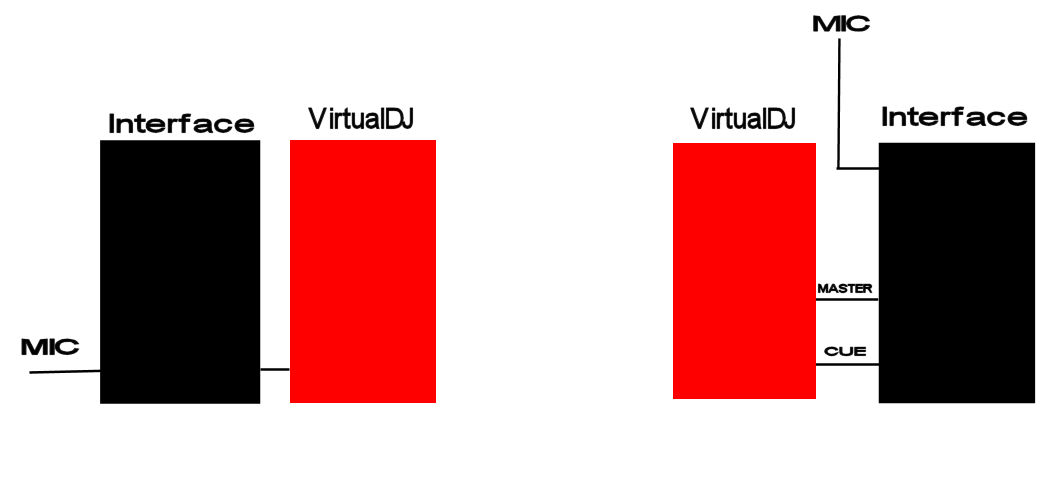
I guess the delay is caused by you running the mic through the VDJ (software) mixer then, rather than directly through the interface. Ideally you'd want an interface with more channels, so you could have a master output, a cue output and a direct mic input.
I made a thing!
Rather than the scenario on the left, you want the one on the right. You'd set up the output of your interface as the record signal in VDJ.
Posted Wed 11 Feb 26 @ 4:17 pm
middleagedrocker
It is a delay, not an echo.
Thanks for the replies on this, much appreciated. At this point, I'm thinking maybe a USB microphone directly into the laptop might be the easiest solution. I found a RODE NT+ for $70 bucks. No interface to monkey around with.
Thanks for the replies on this, much appreciated. At this point, I'm thinking maybe a USB microphone directly into the laptop might be the easiest solution. I found a RODE NT+ for $70 bucks. No interface to monkey around with.
Posted Wed 11 Feb 26 @ 6:06 pm
groovindj
I'd suggest you need to avoid running a mic of any kind through the software, to reduce the likelihood of delays. Using a USB mic would likely make any delay worse.
A typical DJ controller as used by many here would have an onboard audio interface and a direct mic input. It provides a config similar to the one on the right. That's what you need to aim for.
If you're currently using the Behringer to input the mic, what are you using to output the VDJ master signal? How are you monitoring? How are you cueing?
A typical DJ controller as used by many here would have an onboard audio interface and a direct mic input. It provides a config similar to the one on the right. That's what you need to aim for.
If you're currently using the Behringer to input the mic, what are you using to output the VDJ master signal? How are you monitoring? How are you cueing?
Posted Wed 11 Feb 26 @ 6:59 pm
middleagedrocker
I'm really confused here. The Virtual DJ program on my laptop IS acting as a controller. Why would you need another controller outside of VDJ? If I did purchase another controller, it would likely be a RODE Podcaster, which would eliminate the need for Virtual DJ.
I have the headphones plugged directly into the laptop for monitoring, since the signal to the internet would be coming directly from the laptop. There is no latency in the music. I'm not cueing anything, just using the auto-cue in VDJ. The Behringer (with the MIC) connects directly to the laptop via USB.
NOTE: There are 2 line outputs (one for Left and one for Right) on the back of the Behringer, if that information helps. I haven't incorporated them "into the picture" as of yet.
The ONLY place I'm experiencing latency is in the microphone.
I have the headphones plugged directly into the laptop for monitoring, since the signal to the internet would be coming directly from the laptop. There is no latency in the music. I'm not cueing anything, just using the auto-cue in VDJ. The Behringer (with the MIC) connects directly to the laptop via USB.
NOTE: There are 2 line outputs (one for Left and one for Right) on the back of the Behringer, if that information helps. I haven't incorporated them "into the picture" as of yet.
The ONLY place I'm experiencing latency is in the microphone.
Posted Wed 11 Feb 26 @ 7:46 pm
middleagedrocker
Okay, doing more research here...shows software like Virtual DJ or Rodecaster Pro would still be needed. Ugh! BUT, the Rodecaster would come with the Pro software to allow broadcasting to internet radio. Virtual DJ wouldn't be necessary.
Posted Wed 11 Feb 26 @ 7:50 pm
groovindj
No, VirtualDJ is not a controller - it's DJ software. The RODEcaster Pro is not a controller either. If anything, I'd call it a mixer. It would solve the problem though, because you could send the VDJ output to the RODEcaster via USB and plug the mic into the RODEcaster.
Posted Wed 11 Feb 26 @ 8:51 pm
PhantomDeejay
Using a MIC through VirtualDJ is absolutely possible.
However you need to do it the way it needs to be done. Not another way.
I do a live radio show every Friday night and I use a Shure SM7B connected on an UMC1820 without any "real" issues. But, as I said above, I have reduced the latency of the ASIO drivers for both the Behringer UMC1820 and the Pioneer DDJ-800 that I'm using, down to 2 ms
This way a small round trip delay still exists, but unless you crank your headphones volume to 250% your own voice will supress it and you won't really notice / it won't really bother you.
So, as a first step try exactly that. Set your Behringer to use the ASIO drivers (and not WASAPI) and set them to 2ms latency.
Then try again..
PS: Your typical singer that uses a wireless MIC with a wireless IEM system is subject to 3 to 10 ms of round trip latency.
So, if a singer can perform without issues unders those numbers, so should you.
Most likely you don't even use ASIO drivers at the moment and your round trip latency is about 50ms
However you need to do it the way it needs to be done. Not another way.
I do a live radio show every Friday night and I use a Shure SM7B connected on an UMC1820 without any "real" issues. But, as I said above, I have reduced the latency of the ASIO drivers for both the Behringer UMC1820 and the Pioneer DDJ-800 that I'm using, down to 2 ms
This way a small round trip delay still exists, but unless you crank your headphones volume to 250% your own voice will supress it and you won't really notice / it won't really bother you.
So, as a first step try exactly that. Set your Behringer to use the ASIO drivers (and not WASAPI) and set them to 2ms latency.
Then try again..
PS: Your typical singer that uses a wireless MIC with a wireless IEM system is subject to 3 to 10 ms of round trip latency.
So, if a singer can perform without issues unders those numbers, so should you.
Most likely you don't even use ASIO drivers at the moment and your round trip latency is about 50ms
Posted Wed 11 Feb 26 @ 10:04 pm
groovindj
I didn't say it wasn't possible. In his scenario though, using the Behringer as an input is fair enough, assuming ASIO - but he's not using a low latency output. That's likely just adding to any delay caused by passing the mic through the software.
Posted Wed 11 Feb 26 @ 10:59 pm
Farwa Shahab
This is almost always caused by double monitoring.
You are likely hearing:
Direct monitoring from the UMC202HD and Soft monitoring from VirtualDj, with a slight delay between them, creates the echo.
To fix this:
1-Turn off the "Direct Monitor" button on the interface.
2- In Windows Sound Settings, make sure "Listen to this device" is unchecked for the mic.
3-Ensure the mic is not assigned twice in VirtualDJ.
It's not a pro version issue, just a routing/monitoring conflict.
You are likely hearing:
Direct monitoring from the UMC202HD and Soft monitoring from VirtualDj, with a slight delay between them, creates the echo.
To fix this:
1-Turn off the "Direct Monitor" button on the interface.
2- In Windows Sound Settings, make sure "Listen to this device" is unchecked for the mic.
3-Ensure the mic is not assigned twice in VirtualDJ.
It's not a pro version issue, just a routing/monitoring conflict.
Posted Thu 12 Feb 26 @ 5:50 am
PhantomDeejay
Farwa Shahab wrote :
2- In Windows Sound Settings, make sure "Listen to this device" is unchecked for the mic.
2- In Windows Sound Settings, make sure "Listen to this device" is unchecked for the mic.
He should not be using WASAPI, therefore this option is irrelevant. He should be using ASIO (and only ASIO) since a MIC input is involved
Posted Thu 12 Feb 26 @ 7:14 am