


 DJ Bass Phreaker
OK so I'm a massive fan of Stems & use them in pretty much every single set I do. Be that on stage or on radio. It's real nice being able to drop to an acapella as you mix in the next tune to keep things flowing. My issue though is speed!
My system can do Stems 2.0 live & I have done it that way many times. The issue comes when I'm also running other things on the system. I've had VDJ completely lock up, degrade the main audio output (considerably - everyone notices) & just flat out refuse to start up the stems engine.
So to not cause any live headaches, I took to using the 'save prepared stems' feature as soon as I saw it was available & not really looked back since.
However my main thing now is the overall performance of preparing stems in the first place. I've tried various settings over many months & yet still when using the save prepared stems feature, the GPU seems to bounce on usage alot.
Screenshot included
Anyone any ideas on how to sort this out?
NOTE: Doing stem seperation live takes about a minute per tune (maxes the GPU), the prepared stems takes alot longer.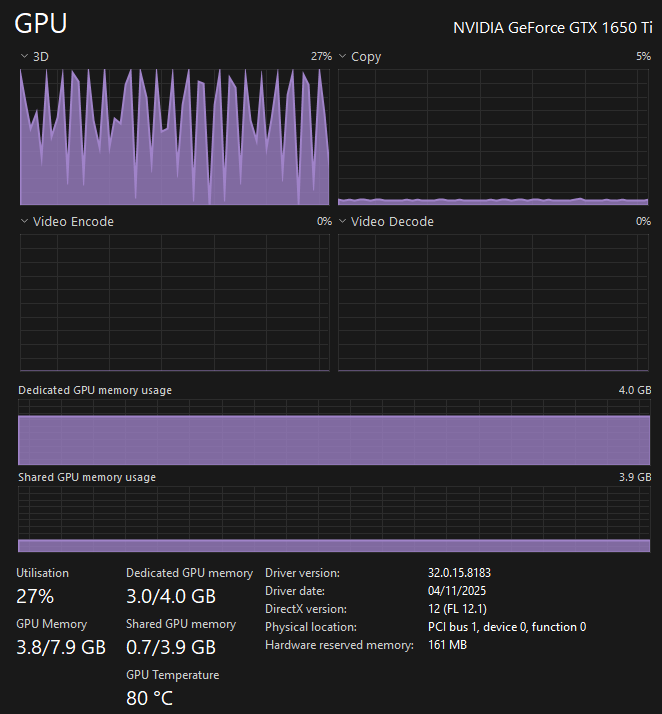

My system can do Stems 2.0 live & I have done it that way many times. The issue comes when I'm also running other things on the system. I've had VDJ completely lock up, degrade the main audio output (considerably - everyone notices) & just flat out refuse to start up the stems engine.
So to not cause any live headaches, I took to using the 'save prepared stems' feature as soon as I saw it was available & not really looked back since.
However my main thing now is the overall performance of preparing stems in the first place. I've tried various settings over many months & yet still when using the save prepared stems feature, the GPU seems to bounce on usage alot.
Screenshot included
Anyone any ideas on how to sort this out?
NOTE: Doing stem seperation live takes about a minute per tune (maxes the GPU), the prepared stems takes alot longer.
Posted Sat 07 Feb 26 @ 11:07 am
 kradcliffe
The GTX1050 is a lower level card and 4gb VRAM is pretty much the base amount required to calculate stems. Taking a minute per track seems a bit excessive though.
Posted Sat 07 Feb 26 @ 11:40 am
DJ Bass Phreaker
Saving the prepared stems in advance can take 5 minutes per track! Which is what is annoying me the most. I have nearly 4 thousand tracks to sort!
Posted Sat 07 Feb 26 @ 12:20 pm
 schmidi_0
Hate to say it but you need to upgrade your GPU. My laptop with a 5070 can stem + lyrics a track in about 6 seconds.
Posted Sat 07 Feb 26 @ 5:27 pm
Sepatro
I recognise this "spiked GPU-use"-pattern.
Does your laptop also become extremely sluggish then? (e.g. very slow to switch from one window to another, very slow to search something on google, etc)?
The bad news: every so many months, I suffer from the same phenomenon, usually after some kind of Windows update.
The good news: so far I always managed to solve it. Usually it has to do with performance settings, and in a very weird way - for instance, when I unplugged my laptop (so it ran on battery only) it worked smoothly and stem performance was way better. I don't remember why, but it had to do with a performance scheme.
After this, the GPU-use did not show any spikes anymore.
Other things that helped: reinstalling a "clean" Windows version without all useless stuff, I followed this tutorial
https://www.youtube.com/watch?v=0PA1wgdMeeI&t=6s
Please let me know how you are proceeding. I am really interested myself in digging deeper into this, because so many people here seem te be affected from cracks & pops, audio dropouts, sluggish behaviour, slow stems, ...
Does your laptop also become extremely sluggish then? (e.g. very slow to switch from one window to another, very slow to search something on google, etc)?
The bad news: every so many months, I suffer from the same phenomenon, usually after some kind of Windows update.
The good news: so far I always managed to solve it. Usually it has to do with performance settings, and in a very weird way - for instance, when I unplugged my laptop (so it ran on battery only) it worked smoothly and stem performance was way better. I don't remember why, but it had to do with a performance scheme.
After this, the GPU-use did not show any spikes anymore.
Other things that helped: reinstalling a "clean" Windows version without all useless stuff, I followed this tutorial
https://www.youtube.com/watch?v=0PA1wgdMeeI&t=6s
Please let me know how you are proceeding. I am really interested myself in digging deeper into this, because so many people here seem te be affected from cracks & pops, audio dropouts, sluggish behaviour, slow stems, ...
Posted Mon 09 Feb 26 @ 12:29 pm
 wickedmix
if you are saving prepared stems you may just try and use the CPU it could be faster than that GPU plus the CPU will probably have more memory to access.
Posted Mon 09 Feb 26 @ 2:54 pm