


 locoDog
Thanks, I'm still not 'there' yet, I'll do the primitive way till it feels natural and tedious then I'll learn the shortcuts
I found the shadertoy, now to stare at the sauce for a bit
https://www.shadertoy.com/view/WsffW7
I found the shadertoy, now to stare at the sauce for a bit
https://www.shadertoy.com/view/WsffW7
Posted Thu 06 Aug 26 @ 6:42 pm
 djcel
djcel
Shadertoy is in GLSL. There are some little differences with HLSL and that's why I provided a template in the project with some defines for compatibility.
It's still basic (no buffer or vertex shader full support, just "Image"). Visuals plugin is more powerful for that.
It's still basic (no buffer or vertex shader full support, just "Image"). Visuals plugin is more powerful for that.
Posted Thu 06 Aug 26 @ 7:23 pm
locoDog
I know the grass is always greener,
but if possible vertex shaders? nearly as much bang for less clock cycle bucks?
https://www.vertexshaderart.com/
I know why atomix went with shadertoy, they just have way more users, submissions and are much more capable, but the site mentioned above has way more on the Gold to Mold ratio
but if possible vertex shaders? nearly as much bang for less clock cycle bucks?
https://www.vertexshaderart.com/
I know why atomix went with shadertoy, they just have way more users, submissions and are much more capable, but the site mentioned above has way more on the Gold to Mold ratio
Posted Mon 10 Aug 26 @ 8:36 pm
djcel
Adding vertex shader is not so complex. I just wanted to keep the plugin simple and only to modify the texture.
You can have a look here to import the vertex shaders code:
https://github.com/DJCEL/VirtualDJ-VideoRotation-Win64/tree/main/src/Shaders
You can have a look here to import the vertex shaders code:
https://github.com/DJCEL/VirtualDJ-VideoRotation-Win64/tree/main/src/Shaders
Posted Mon 10 Aug 26 @ 8:52 pm
 groovindj
Yes, those vertex ones look a "bit more Milkdrop".
Posted Mon 10 Aug 26 @ 10:25 pm
locoDog
@Cel Thanks, I'm in slightly over my head [from a few different angles] but that's where the fun is.
If I can get it working are you fine with my forking the plugin for a vertex version? [After I check licencing over on the vertex site.]
If I can get it working are you fine with my forking the plugin for a vertex version? [After I check licencing over on the vertex site.]
Posted Mon 10 Aug 26 @ 11:01 pm
djcel
No problem. A little helper for D3D11:
https://virtualdj.com/user/djcel/blogs/6082/Direct3D11.html
https://github.com/microsoft/DirectXTK/tree/main/Src/Shaders
You can also use if you prefer:
using Microsoft::WRL::ComPtr;
https://virtualdj.com/user/djcel/blogs/6082/Direct3D11.html
https://github.com/microsoft/DirectXTK/tree/main/Src/Shaders
You can also use if you prefer:
using Microsoft::WRL::ComPtr;
Posted Tue 11 Aug 26 @ 2:54 am
locoDog
eugh I remember comPtr from last dx11 project I did years back.
You've got to remember, I'm out of my depth on almost everything, anything new needs +3 tabs, every error is +3 tabs, every tab is +3 tabs.
Easy errors for a CS background, I learnt by online tutorials build a calculator, half watched half remembered [from sometimes half arsed] YT video
But progress, I dropped all the frag shader stuff as it was just confusing keeping that working and adding the new.
an animated hard coded vertex shader
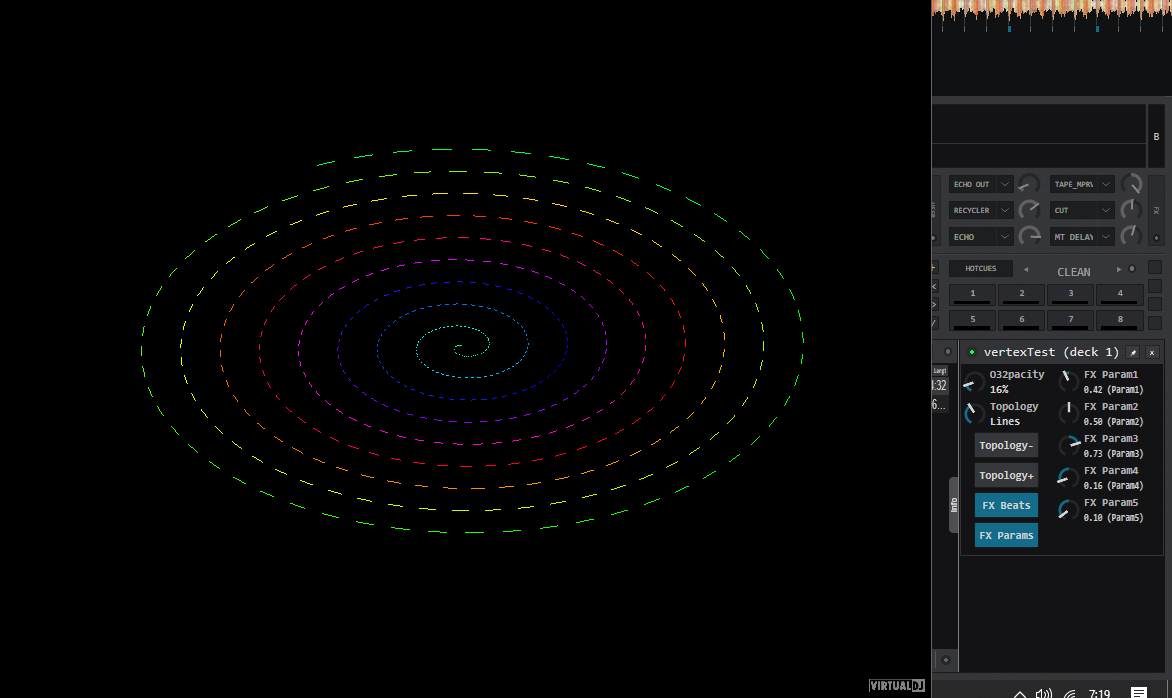
You've got to remember, I'm out of my depth on almost everything, anything new needs +3 tabs, every error is +3 tabs, every tab is +3 tabs.
Easy errors for a CS background, I learnt by online tutorials build a calculator, half watched half remembered [from sometimes half arsed] YT video
But progress, I dropped all the frag shader stuff as it was just confusing keeping that working and adding the new.
an animated hard coded vertex shader
Posted Wed 12 Aug 26 @ 6:59 am
locoDog
djcel wrote :
It's still basic (no buffer or vertex shader full support, just "Image"). Visuals plugin is more powerful for that.
Is it? iChannel inputs but no buffer or common tab as far as I see with the native offering.
Posted Tue 18 Aug 26 @ 2:36 am
locoDog
Did you nuke the sauce for vs22 tool set?
pretty short on HDD space here so reluctant to upgrade to VS26
went to vs26 - that was a mistake
pretty short on HDD space here so reluctant to upgrade to VS26
went to vs26 - that was a mistake
Posted Fri 21 Aug 26 @ 4:09 am
djcel
Yes i have finished to migrate all my own projects in VS2026 and I have uninstalled VS2022
You can find it in an old release but then you need to adapt a bit.
https://github.com/DJCEL/VirtualDJ-PixelShader8-Win64/releases/tag/v2.3
You can find it in an old release but then you need to adapt a bit.
https://github.com/DJCEL/VirtualDJ-PixelShader8-Win64/releases/tag/v2.3
Posted Fri 21 Aug 26 @ 5:57 am
locoDog
I've just done the same and now am dealing with VS gremlins.
bye bye vs22
vs2026 already feels like a mistake just from the change in the purple colour
bye bye vs22
vs2026 already feels like a mistake just from the change in the purple colour
Posted Fri 21 Aug 26 @ 6:10 am
locoDog
Just had an idea, I think it's a good one, I'm going to try make it myself as a stand alone but it's one of those ideas that could be made in different ways, so I'd be interested with what you come up with [if you find the idea interesting]
video echo
video echo
Posted Tue 25 Aug 26 @ 1:24 am
locoDog
one you can add/edit
// =========================================================================
// Rain Drop Ripples (Converted from GLSL Shadertoy to Direct3D 11 HLSL)
// =========================================================================

cbuffer PS_CONSTANTBUFFER : register(b0)
{
    float FX_Time;
    float FX_SongPosBeats;
    float FX_Width;
    float FX_Height;
    float FX_Beats_on;
    float FX_params_on;
    float FX_param1;
    float FX_param2;
    float FX_param3;
    float FX_param4;
    float FX_param5;
    float FX_VertexCount;
    float FX_BlackAlpha;
    float FX_DrawAlpha;
    float FX_TopologyMode;
    float FX_Zoom;
    float FX_HueShift;
    float FX_PointSize;
    float FX_AudioLevel;
    float FX_BlackReveal;
    float FX_BackgroundR;
    float FX_BackgroundG;
    float FX_BackgroundB;
    float FX_BackgroundOpacity;
};

Texture2D g_Texture : register(t0);
SamplerState g_Sampler : register(s0);

struct PS_INPUT
{
    float4 pos : SV_Position;
};

#define MAX_RADIUS 2
#define DOUBLE_HASH 0

#define HASHSCALE1 0.1031
#define HASHSCALE3 float3(0.1031, 0.1030, 0.0973)

// --- Helper Functions ---
float hash12(float2 p)
{
    float3 p3 = frac(p.xyx * HASHSCALE1);
    p3 += dot(p3, p3.yzx + 19.19);
    return frac((p3.x + p3.y) * p3.z);
}

float2 hash22(float2 p)
{
    float3 p3 = frac(p.xyx * HASHSCALE3);
    p3 += dot(p3, p3.yzx + 19.19);
    return frac((p3.xx + p3.yz) * p3.zy);
}

// --- Main Pixel Shader ---
float4 ps_main(PS_INPUT input) : SV_TARGET
{
    float2 iResolution = float2(FX_Width, FX_Height);

    // Convert D3D11 top-left screen coords to GLSL bottom-left origin
    float2 fragCoord = float2(input.pos.x, iResolution.y - input.pos.y);
    float iTime = FX_Time;

    // Ripple Grid Scale (Param1 modulates resolution if adjusted)
    float resolution = 10.0;
    if (FX_param1 > 0.0)
    {
        resolution = lerp(5.0, 25.0, FX_param1);
    }

    float2 uv = fragCoord.xy / iResolution.y * resolution;
    float2 p0 = floor(uv);
    float2 circles = float2(0.0, 0.0);

    // Calculate Grid Ripples
    for (int j = -MAX_RADIUS; j <= MAX_RADIUS; ++j)
    {
        for (int i = -MAX_RADIUS; i <= MAX_RADIUS; ++i)
        {
            float2 pi = p0 + float2((float) i, (float) j);

#if DOUBLE_HASH
            float2 hsh = hash22(pi);
#else
            float2 hsh = pi;
#endif

            float2 p = pi + hash22(hsh);
            float t = frac(0.3 * iTime + hash12(hsh));
            float2 v = p - uv;

            float d = length(v) - ((float) MAX_RADIUS + 1.0) * t;
            float h = 0.001;

            float d1 = d - h;
            float d2 = d + h;

            float p1 = sin(31.0 * d1) * smoothstep(-0.6, -0.3, d1) * smoothstep(0.0, -0.3, d1);
            float p2 = sin(31.0 * d2) * smoothstep(-0.6, -0.3, d2) * smoothstep(0.0, -0.3, d2);

            // Safe normalize to prevent divide-by-zero artifacts
            float lenV = length(v);
            float2 normV = lenV > 0.0001 ? (v / lenV) : float2(0.0, 0.0);

            circles += 0.5 * normV * ((p2 - p1) / (2.0 * h)) * (1.0 - t) * (1.0 - t);
        }
    }

    circles /= (float) ((MAX_RADIUS * 2 + 1) * (MAX_RADIUS * 2 + 1));

    // Calculate Ripple Distortion Intensity
    float intensity = lerp(
        0.01,
        0.15,
        smoothstep(0.1, 0.6, abs(frac(0.05 * iTime + 0.5) * 2.0 - 1.0))
    );

    // Optional audio reactivity boost when music plays
    intensity *= (1.0 + FX_AudioLevel * 1.5 * FX_param2);

    // Compute Texture UV Displacement
    float2 texUV = fragCoord.xy / iResolution.xy;
    texUV.y = 1.0 - texUV.y;

    texUV.x += intensity * circles.x;
    texUV.y -= intensity * circles.y;

    // Clamp UVs to avoid edge wrap artifacts
    texUV = clamp(texUV, float2(0.001, 0.001), float2(0.999, 0.999));

    // Sample video texture
    float3 color = g_Texture.Sample(g_Sampler, texUV).rgb;

    return float4(color, FX_DrawAlpha);
}
Posted Wed 26 Aug 26 @ 12:04 pm