


 PhantomDeejay
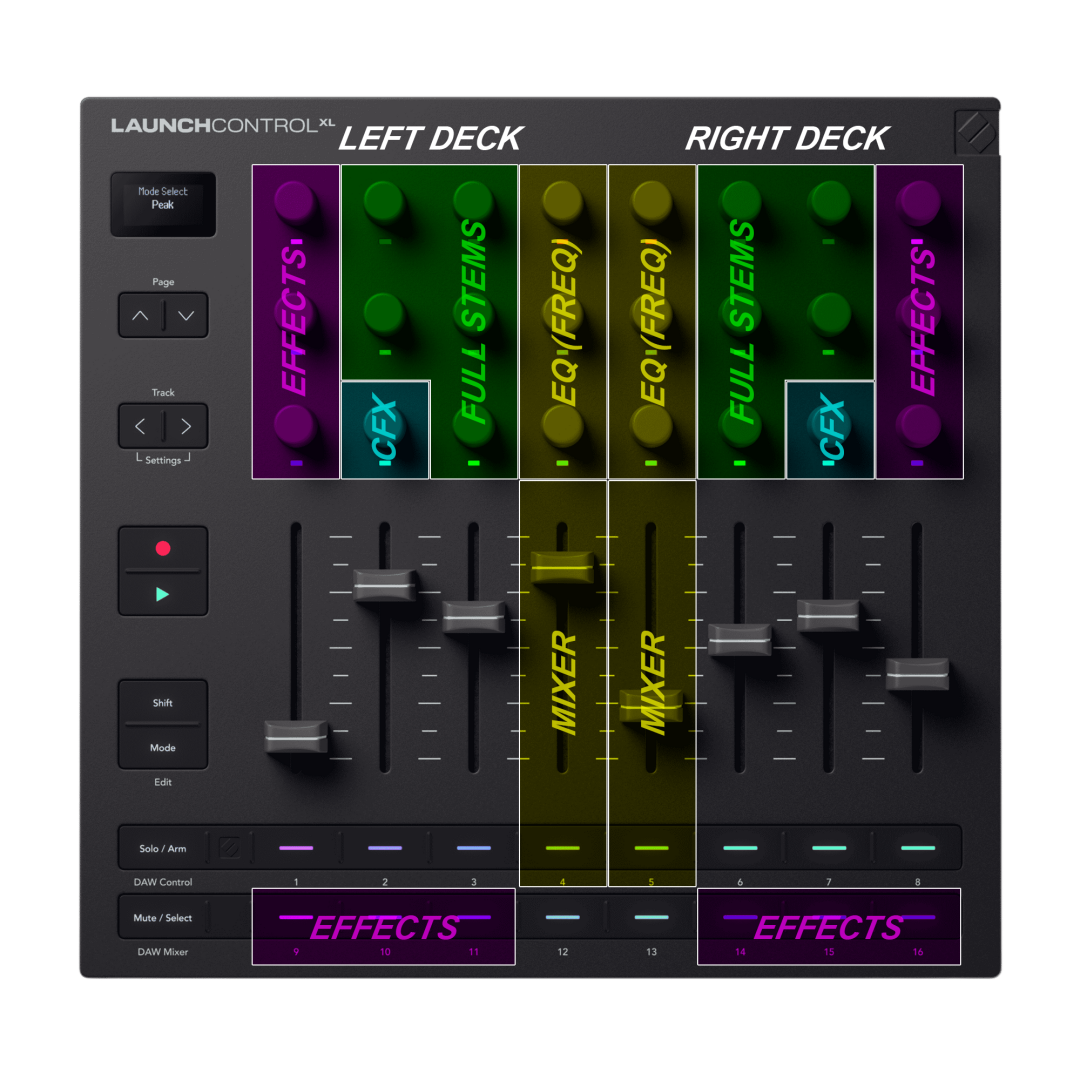
TEMPLATE 2
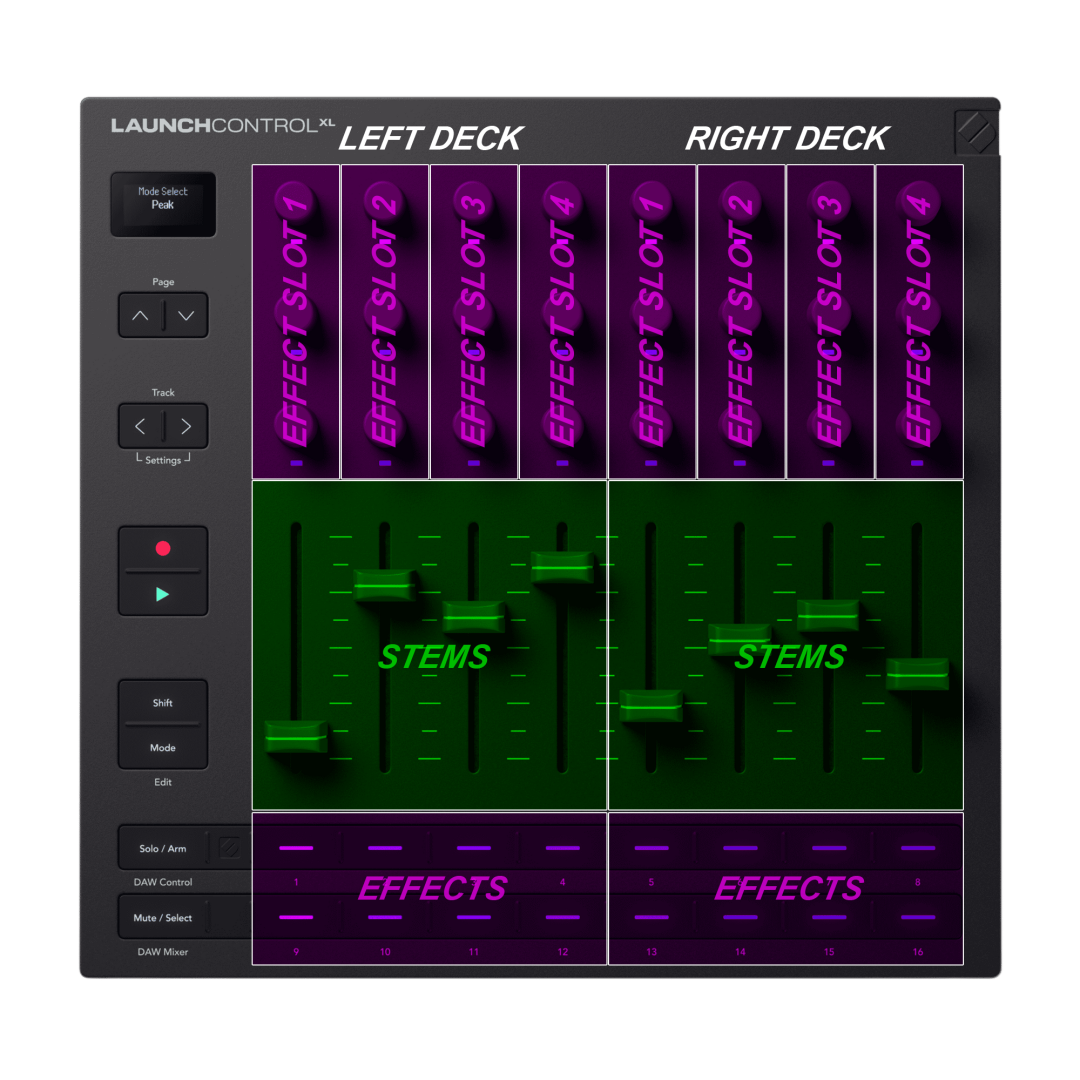
Since I'm preparing the files for the unit's manual, I thought I would share these.
They are the overview of the two templates offered.
Manual should be ready by tomorrow anyways..
PS: If there's any suggestion that would make sense to add (mostly on Template 1) I'm open to update/modify it.
Thanks!
Posted Wed 22 Apr 26 @ 8:00 pm
 locoDog
neat schema;
template 1; encoder push is kill? [kill:neutral eq, mute:unmute stems, on:off cfx, 0%:default fx, ]
4||12, 5||13 mute while_pressed ?
1,2,3,6.7,8; effect_select_popup that encoder navigates?
LED under encoder, color_mix?
Side idea, you have 2*8 pads there [1-16], you could move effect_active to encoder push and also have pads.
looks like a nice bit of HW, just about right, enough pokey bits to plug & play, plenty of scope to nerd out, not too many pokey bits to need an hour refresher course if you don't touch it in 2 weeks [how hard you nerded out dependant]
I said it before, with my remix skin I'd have a field day, but then... I'd be remapping all my Aux devices plus this thing... it wouldn't be a 'field day' it would be a several month festival with beer* laden air drops.
template 1; encoder push is kill? [kill:neutral eq, mute:unmute stems, on:off cfx, 0%:default fx, ]
4||12, 5||13 mute while_pressed ?
1,2,3,6.7,8; effect_select_popup that encoder navigates?
LED under encoder, color_mix?
Side idea, you have 2*8 pads there [1-16], you could move effect_active to encoder push and also have pads.
looks like a nice bit of HW, just about right, enough pokey bits to plug & play, plenty of scope to nerd out, not too many pokey bits to need an hour refresher course if you don't touch it in 2 weeks [how hard you nerded out dependant]
I said it before, with my remix skin I'd have a field day, but then... I'd be remapping all my Aux devices plus this thing... it wouldn't be a 'field day' it would be a several month festival with beer* laden air drops.
Posted Wed 22 Apr 26 @ 9:17 pm
PhantomDeejay
There's no "push" functionality on encoders.
On template 1 I guess I could put effect select on buttons 1,2,3,6,7,8 since that's what I have done on template 2.
My thought though was to leave the entire line clear so that there's no confusion with buttons 4 and 5 that are PFL.
I will give it some second thought...
On template 1 I guess I could put effect select on buttons 1,2,3,6,7,8 since that's what I have done on template 2.
My thought though was to leave the entire line clear so that there's no confusion with buttons 4 and 5 that are PFL.
I will give it some second thought...
Posted Wed 22 Apr 26 @ 10:19 pm
locoDog
no push encoders?, guess they need to save ideas for the mk4.
Posted Wed 22 Apr 26 @ 11:55 pm
 IIDEEJAYII
Template 1:
the 6 currently unused sliders, could possibly, be mapped as, say EZ-Remix Stems crossfaders, to Crossfade each of the EZ-Remix stems, between the Left and Right decks, (and likewise, the other 3, to crossfade the 3 Frequency EQs, left and right)
pads 12 and 13 used as "SHIFT" and "ALT", to add 2 additional functions to each of the existing controls "while_pressed"
Or, to use 12, 13 to shift all functioning to each of lower decks when enabled.
in otherwords, when pad 12 is active, the left half of the Lauchcontrol XL3 controls the lower left deck.
and when pad 13 is active, the right half of the Lauchcontrol XL3 controls the lower right deck.
--------
Another approach:
use one of sliders (per side), to, BOTH isolate, stem vocal, AND increase channel gain by a small amount.
(maybe with the gain increase = 50% of the vocal isolate)
Slider Up = Auto Gain 50% and Vocal isolate 50% (none), and Slider Down = Auto Gain 62%, and Vocal Isolate 75% (3 o'clock)
Used for tweaking, when the vocals need bit more "presence" in a track.
the 6 currently unused sliders, could possibly, be mapped as, say EZ-Remix Stems crossfaders, to Crossfade each of the EZ-Remix stems, between the Left and Right decks, (and likewise, the other 3, to crossfade the 3 Frequency EQs, left and right)
pads 12 and 13 used as "SHIFT" and "ALT", to add 2 additional functions to each of the existing controls "while_pressed"
Or, to use 12, 13 to shift all functioning to each of lower decks when enabled.
in otherwords, when pad 12 is active, the left half of the Lauchcontrol XL3 controls the lower left deck.
and when pad 13 is active, the right half of the Lauchcontrol XL3 controls the lower right deck.
--------
Another approach:
use one of sliders (per side), to, BOTH isolate, stem vocal, AND increase channel gain by a small amount.
(maybe with the gain increase = 50% of the vocal isolate)
Slider Up = Auto Gain 50% and Vocal isolate 50% (none), and Slider Down = Auto Gain 62%, and Vocal Isolate 75% (3 o'clock)
Used for tweaking, when the vocals need bit more "presence" in a track.
Posted Thu 23 Apr 26 @ 3:50 am
PhantomDeejay
All of these ideas are nice, but not for a factory mapper I think.. I mean, 9 out of 10 users will try to use it "as is" without reading any manual, and memorizing more advanced stuff without a silkscreen is not that easy.
We prefer to "keep it simple", unless a simple but brilliant idea missed our attention..
PS: Since those faders are not assigned to anything, it would be easier I think for an advanced user to remap them and add what he wants/likes, rather than having to figure out what to change on a more complex mapping.. I mean you literally have to substitute nothing with any script you like (as long as it's normalized) and you're done!
We prefer to "keep it simple", unless a simple but brilliant idea missed our attention..
PS: Since those faders are not assigned to anything, it would be easier I think for an advanced user to remap them and add what he wants/likes, rather than having to figure out what to change on a more complex mapping.. I mean you literally have to substitute nothing with any script you like (as long as it's normalized) and you're done!
Posted Thu 23 Apr 26 @ 7:09 am
IIDEEJAYII
Yes.. agree.. for the factory mapping, it's great, to allow every user a place to create their own customization, to their individual work flow.
As some may be more interested in lighting control vs EQ's , effects or video, etc.
Awesome job Phantom, with the layout.
And tempted, to add to my setup. lol
As some may be more interested in lighting control vs EQ's , effects or video, etc.
Awesome job Phantom, with the layout.
And tempted, to add to my setup. lol
Posted Thu 23 Apr 26 @ 7:27 am
Yan Duval
locoDog wrote :
no push encoders?, guess they need to save ideas for the mk4.
Yes! And the also need to add relative mode for the user Midi mode. I hope they'll do it in a further firmware release.
Posted Mon 27 Apr 26 @ 12:42 pm
Yan Duval
This looks great!
I think many people would like to see a way to swap decks on their main controller. FLX4 and others don't have that. Ableton button + button1 to swap the left side, button8 for right side? As locodog suggested, change some colors for visual feedback .
As a template 3, I've seen suggestions to use it as a light controller, maybe too specific.
For my personal need, I tried to map it to be a small limited controller, for use on the side of my desk when I'm working. The lack of availabity of relative encoder stopped me (jogwheel), but I'll redo it with the new device definition. I think it's worth doing as a 3rd template since this is quite different from the other too and can lead to further good ideas for personal implementation.
Since you've just done it, it may be a good time to do the newer Launchcontrol (not-XL). Full stems and 1 effect probably...
I think many people would like to see a way to swap decks on their main controller. FLX4 and others don't have that. Ableton button + button1 to swap the left side, button8 for right side? As locodog suggested, change some colors for visual feedback .
As a template 3, I've seen suggestions to use it as a light controller, maybe too specific.
For my personal need, I tried to map it to be a small limited controller, for use on the side of my desk when I'm working. The lack of availabity of relative encoder stopped me (jogwheel), but I'll redo it with the new device definition. I think it's worth doing as a 3rd template since this is quite different from the other too and can lead to further good ideas for personal implementation.
Since you've just done it, it may be a good time to do the newer Launchcontrol (not-XL). Full stems and 1 effect probably...
Posted Mon 27 Apr 26 @ 1:03 pm
PhantomDeejay
Manual is on-line: https://www.virtualdj.com/manuals/hardware/novation/launchcontrolxl3.html
And if you take a look at the Templates, you can change the "left" and "right" deck simply by pushing the "Track Left/Right" buttons.
Which also are RGB and change color to show you which is the currently selected left or right deck.
And if you take a look at the Templates, you can change the "left" and "right" deck simply by pushing the "Track Left/Right" buttons.
Which also are RGB and change color to show you which is the currently selected left or right deck.
Posted Mon 27 Apr 26 @ 1:38 pm
Yan Duval
Great thanks! I can’t wait to try it.
Posted Tue 28 Apr 26 @ 1:15 am
Yan Duval
Hi!
Thanks for the new release, I was able to test and it will be great to use!
There is for now a little problem with Row A. Even if EncoderRow-A is ticked on Relative mode, the row will be in Absolute mode. B and C rows behave as expected. If I tick Absolute and then Relative after startup, Row A will then be in Relative mode and it will remain correct until I restart. It looks like the command for Row A in Relative mode is not sent or not received correctly on startup.
I also had another issue, peculiar but possibly not important. I had to restart maybe 10 times to get the controller to work. First time it was not recognized ,second it was recognized but no change in behavior, 3rd I think the LED's were wrong but the encoders operated, etc. I think the last step was to have the page arrows light up for the first time. Everything now seems fine after this initialization.
Thanks for the new release, I was able to test and it will be great to use!
There is for now a little problem with Row A. Even if EncoderRow-A is ticked on Relative mode, the row will be in Absolute mode. B and C rows behave as expected. If I tick Absolute and then Relative after startup, Row A will then be in Relative mode and it will remain correct until I restart. It looks like the command for Row A in Relative mode is not sent or not received correctly on startup.
I also had another issue, peculiar but possibly not important. I had to restart maybe 10 times to get the controller to work. First time it was not recognized ,second it was recognized but no change in behavior, 3rd I think the LED's were wrong but the encoders operated, etc. I think the last step was to have the page arrows light up for the first time. Everything now seems fine after this initialization.
Posted Mon 04 May 26 @ 9:33 pm
PhantomDeejay
Any chance you have something else running that could cause a conflict ?
I never had any issues with relative/absolute mode, yet alone the weird "initialization" process you mentioned..
In fact, since the default mapper uses relative mode, I had the unit encoders on all rows in relative mode 90% of the time, during numerous restarts of VirtualDJ, my computer, other devices getting connected / disconnected e.t.c. without any issue..
Have you updated the unit in the latest firmware ?
Novation is VERY aggressive about using it's own instructions and updating the firmware.
Also you don't have any custom mappers left overs, do you ?
I'm just trying to understand why it doesn't work right for you when it works fine on me on 4 different test systems (of which only one of them is a dev machine)..
I never had any issues with relative/absolute mode, yet alone the weird "initialization" process you mentioned..
In fact, since the default mapper uses relative mode, I had the unit encoders on all rows in relative mode 90% of the time, during numerous restarts of VirtualDJ, my computer, other devices getting connected / disconnected e.t.c. without any issue..
Have you updated the unit in the latest firmware ?
Novation is VERY aggressive about using it's own instructions and updating the firmware.
Also you don't have any custom mappers left overs, do you ?
I'm just trying to understand why it doesn't work right for you when it works fine on me on 4 different test systems (of which only one of them is a dev machine)..
Posted Tue 05 May 26 @ 7:47 am
Yan Duval
Yes, I'm running the latest firmware.
Yes, I had some custom device and mapper done. They were all moved in different directories.
I removed everything but the USB cable to the Launchcontrol, rebooted, restarted and Row A is still in Absolute mode.
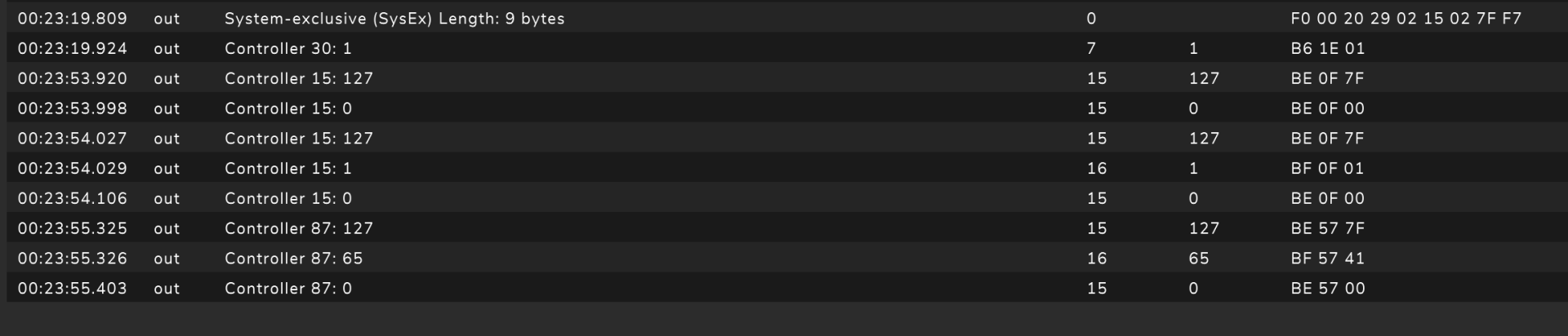
I attach an image of what I see in MidiView while starting up, turning a row A encoder and finally turning a row B encoder. Sysex and Controller 30:1 happen at startup.
Yes, I had some custom device and mapper done. They were all moved in different directories.
I removed everything but the USB cable to the Launchcontrol, rebooted, restarted and Row A is still in Absolute mode.
I attach an image of what I see in MidiView while starting up, turning a row A encoder and finally turning a row B encoder. Sysex and Controller 30:1 happen at startup.
Posted Tue 05 May 26 @ 1:11 pm
PhantomDeejay
I will check again, but going from 0 to 127 and back to 0 without any intermediate values is not right either..
You're on a MAC, right ?
Just to be sure, what's the port names of your LCXL3 under MIDI studio ?
VirtualDJ should send A LOT more messages during startup after the SYSEX shown in your screen capture..
You're on a MAC, right ?
Just to be sure, what's the port names of your LCXL3 under MIDI studio ?
VirtualDJ should send A LOT more messages during startup after the SYSEX shown in your screen capture..
Posted Tue 05 May 26 @ 1:46 pm
Yan Duval
I'm on Win11,Surface Pro 10. The name in Midiview is "MIDIIN2 (LCXL3 1 MIDI)". Could be that Midiview filters out some Midi? What is your prefered Midi tool in Windows?
Posted 7 days ago @ 1:26 pm
PhantomDeejay
Never mind. We have identified the root of the issue and we will push an update to fix it.
Just FYI, the message to set the knobs to relative mode was sent before the unit was set fully in DAW mode and this made the unit sometimes to reject it.
With the new mapper update, VirtualDJ will wait for the unit to fully enter DAW mode before it sends the message to switch the knobs to Relative mode.
Just FYI, the message to set the knobs to relative mode was sent before the unit was set fully in DAW mode and this made the unit sometimes to reject it.
With the new mapper update, VirtualDJ will wait for the unit to fully enter DAW mode before it sends the message to switch the knobs to Relative mode.
Posted 7 days ago @ 9:22 pm
Yan Duval
Thanks, I look forward to the update. I also appreciate that you share some of the background info.
Posted 6 days ago @ 10:24 am
PhantomDeejay
In this case the background info is important if you are going to remap the factory default "DAW" modes.
Prior to the mapper update, when you connected LCXL3, a controller specific variable controllervar '$LCXL3_Mode' would be set according to the active template (2 DAW and 16 User templates)
The controllervar would take values from 0 to 17.
Now, after the mapper update, this same controllervar will take values from 1 to 18.
Also now the mapper "waits" for the controllervar to switch from 0 to "any" other value before sending the message to set the encoders in the desired mode.
This means that if you are going to remap the DAW modes of the unit you need to keep the part of the mapper that sets that controllervar.
This is happening on the keys:
MODE_DAW_MIXER, MODE_DAW_CONTROL, MODE_CUSTOM_01, ... , MODE_CUSTOM_16
You can remap those keys, but you should keep the controllervar '$LCXL3_Mode' 1 part of the mapper.
Of course, other ways to "force" the encoders into a specific mode of operation do exist, in which case all of the above do not really matter anymore.
I will try to think of a nice way to put this info on the device manual as well.
Prior to the mapper update, when you connected LCXL3, a controller specific variable controllervar '$LCXL3_Mode' would be set according to the active template (2 DAW and 16 User templates)
The controllervar would take values from 0 to 17.
Now, after the mapper update, this same controllervar will take values from 1 to 18.
Also now the mapper "waits" for the controllervar to switch from 0 to "any" other value before sending the message to set the encoders in the desired mode.
This means that if you are going to remap the DAW modes of the unit you need to keep the part of the mapper that sets that controllervar.
This is happening on the keys:
MODE_DAW_MIXER, MODE_DAW_CONTROL, MODE_CUSTOM_01, ... , MODE_CUSTOM_16
You can remap those keys, but you should keep the controllervar '$LCXL3_Mode' 1 part of the mapper.
Of course, other ways to "force" the encoders into a specific mode of operation do exist, in which case all of the above do not really matter anymore.
I will try to think of a nice way to put this info on the device manual as well.
Posted 6 days ago @ 10:59 am