


 DJ Entrada
Wow, you managed to upload that faster than I could post about what I changed in the skin to make it more visible.
This is what I had gone for:
Find the section with <define color="col_wave_vocal" and replace it with
<define color="col_wave_vocal" value="#134d13"/>
<define color="col_wave_instru" value="#ffa200"/>
<define color="col_wave_beat" value="#1500ff"/>
<define color="col_wave_novocal" value="#606060"/>
<define color="col_wave_noinstru" value="#7e7e7e"/>
<define color="col_wave_nobeat" value="#b1b1b1"/>
The trick is making the vocal section darker, as that's the one that spreads the furthest, and appears underneath the lyrcs
This is what I had gone for:
Find the section with <define color="col_wave_vocal" and replace it with
<define color="col_wave_vocal" value="#134d13"/>
<define color="col_wave_instru" value="#ffa200"/>
<define color="col_wave_beat" value="#1500ff"/>
<define color="col_wave_novocal" value="#606060"/>
<define color="col_wave_noinstru" value="#7e7e7e"/>
<define color="col_wave_nobeat" value="#b1b1b1"/>
The trick is making the vocal section darker, as that's the one that spreads the furthest, and appears underneath the lyrcs
Posted Sun 07 Dec 25 @ 11:42 pm
 FD-SALSOUL-DJ
Great Job as always PhantomDJ. Thank You for adding the Rhythm Colors Schemes Choices.!!!
Posted Mon 08 Dec 25 @ 2:38 am
 PhantomDeejay
DJ Entrada wrote :
A little request, please could you add 90Hz to the skinFPS menu?
Added on latest update.
Posted Mon 08 Dec 25 @ 7:56 am
 The Party Engineer
Phantom my friend, you are not exist :-) ... your skins always bring to front, many of the advanced features of VDJ and make them easily accessible. Every time i find at your new skin, what i wish to have , and a lot more i didn't know that i wanted to have.
I have a suggestion tho. A lot of DJs are use VST plugins at master FX. If you put a drop down selector for the master FX1 and the settings button for the selected effect, at the top bar, left side of the MST BUS button, we will have access to the settings window of the plugin with just one click. Also we will not have to close the MST BUS pop up window, every time we access the settings window of a plugin.To put just on-off button and settings button of all three master FXs, its also an option.
Thanks again and keep up the great job ....
I have a suggestion tho. A lot of DJs are use VST plugins at master FX. If you put a drop down selector for the master FX1 and the settings button for the selected effect, at the top bar, left side of the MST BUS button, we will have access to the settings window of the plugin with just one click. Also we will not have to close the MST BUS pop up window, every time we access the settings window of a plugin.To put just on-off button and settings button of all three master FXs, its also an option.
Thanks again and keep up the great job ....
Posted Mon 08 Dec 25 @ 8:39 pm
 The Blendmaster
Phantom Dj really love the new skin. GTS 21 is what I use on a regular. Quick question In the video page is it possible to make dragging to the top of video link video to audio tracks like it is natively? I tried that and it just loaded the track as a song when I dragged to the left deck video screen. Oh and can we get a crossfader for the audio to so we can dj without a controller on the video page :-)
Posted Tue 09 Dec 25 @ 3:49 am
PhantomDeejay
I added an option to allow linking (the option is on the skin menu, but visible only when video view is open)
The reason linking was disabled is the size of the screens. With such big screens you have to be very careful when trying to load a song, so that you don't end up accidentally linking files instead of loading them.
Anyway, I added the option and the default behavior is the same as before (no linking) so you'll have to enable it for yourself.
For extra crossfader I'll see what I can do when I introduce some new things on the skin later down the road (more major updates)
The reason linking was disabled is the size of the screens. With such big screens you have to be very careful when trying to load a song, so that you don't end up accidentally linking files instead of loading them.
Anyway, I added the option and the default behavior is the same as before (no linking) so you'll have to enable it for yourself.
For extra crossfader I'll see what I can do when I introduce some new things on the skin later down the road (more major updates)
Posted Tue 09 Dec 25 @ 7:47 am
 Paul Wante
Great great skin, thank you!!! One thing I am missing, and I hope that you can help me with that. I want to see my battery info. Just in case I have not plugged in or the battery is almost drained. I hoped that that I could activate thing in the top bar, but I don't see an option for that.
And again thank you for all the effort in making this amazing skin.
And again thank you for all the effort in making this amazing skin.
Posted Tue 09 Dec 25 @ 12:23 pm
PhantomDeejay
No, I have not included a battery indicator. I will try to do something for the next update though..
Posted Tue 09 Dec 25 @ 12:52 pm
Paul Wante
PhantomDeejay wrote :
No, I have not included a battery indicator. I will try to do something for the next update though..
If you be so kind to set this option in the next release, this skin would be 100% perfect for me 🤗Thank you for all the work! You have the best skin for VDJ. I am a big fan of it.
Posted Tue 09 Dec 25 @ 9:47 pm
nikosz11
καλημέρα θα το τιμήσουμε όπως και το προηγούμενο! καταπληκτική δουλειά. για να βάλουμε συντομεύσεις από λίστες και subfolders? ιδια εντολη?
Posted Sat 13 Dec 25 @ 7:52 am
 watty_2007
Great skin, make a 2 deck version in the future
Posted Sat 13 Dec 25 @ 3:34 pm
 DJ*UC*2020
Phantom Thank you for this update to a great VDJ skin, keep up your good work :)
Posted Fri 19 Dec 25 @ 4:39 am
AnthonyBLTZPLS
Εξαιρετικό !!! Ευχαριστούμε
Δεν έχω βρει το option της "ημέρας" ( λευκή έκδοση ) καθώς και θα ήθελα το key του τραγουδιού να εμφανίζεται με μεγαλύτερη ένδειξη ( στο μέγεθος και θέση της έκδοσης 2κ21 ).
Και πάλι ευχαριστούμε
Δεν έχω βρει το option της "ημέρας" ( λευκή έκδοση ) καθώς και θα ήθελα το key του τραγουδιού να εμφανίζεται με μεγαλύτερη ένδειξη ( στο μέγεθος και θέση της έκδοσης 2κ21 ).
Και πάλι ευχαριστούμε
Posted Mon 29 Dec 25 @ 1:01 pm
PhantomDeejay
Daylight mode exists, but it's hidden since I didn't had time to test it.
It will come on a future update now that the basic skin functionality has been finished.
As for key size and position, which view (layout) do you refer to ? I cannot make any promises but I can take a look.
It will come on a future update now that the basic skin functionality has been finished.
As for key size and position, which view (layout) do you refer to ? I cannot make any promises but I can take a look.
Posted Mon 29 Dec 25 @ 2:21 pm
AnthonyBLTZPLS
Thanks again ...
Here is the option that i would like to see again at the skin you made
https://ibb.co/JjGgLjm3
Here is the option that i would like to see again at the skin you made
https://ibb.co/JjGgLjm3
Posted Mon 29 Dec 25 @ 7:06 pm
FD-SALSOUL-DJ
Just wondering, what was added in V1.0.41?
Posted Tue 30 Dec 25 @ 6:45 pm
PhantomDeejay
Mostly the option to use "Absolute" times on decks (so that time display doesn't change when you change pitch, similar to some hardware gear)
Also version 1.0.42 adds support for battery indicator
Also version 1.0.42 adds support for battery indicator
Posted Tue 30 Dec 25 @ 9:23 pm
FD-SALSOUL-DJ
PhantomDeejay wrote :
Mostly the option to use "Absolute" times on decks (so that time display doesn't change when you change pitch, similar to some hardware gear)
Also version 1.0.42 adds support for battery indicator
Also version 1.0.42 adds support for battery indicator
Thanks for the Info, keep up the great work you're doing. Happy Holidays.!!!
Posted Tue 30 Dec 25 @ 11:34 pm
 blckjck
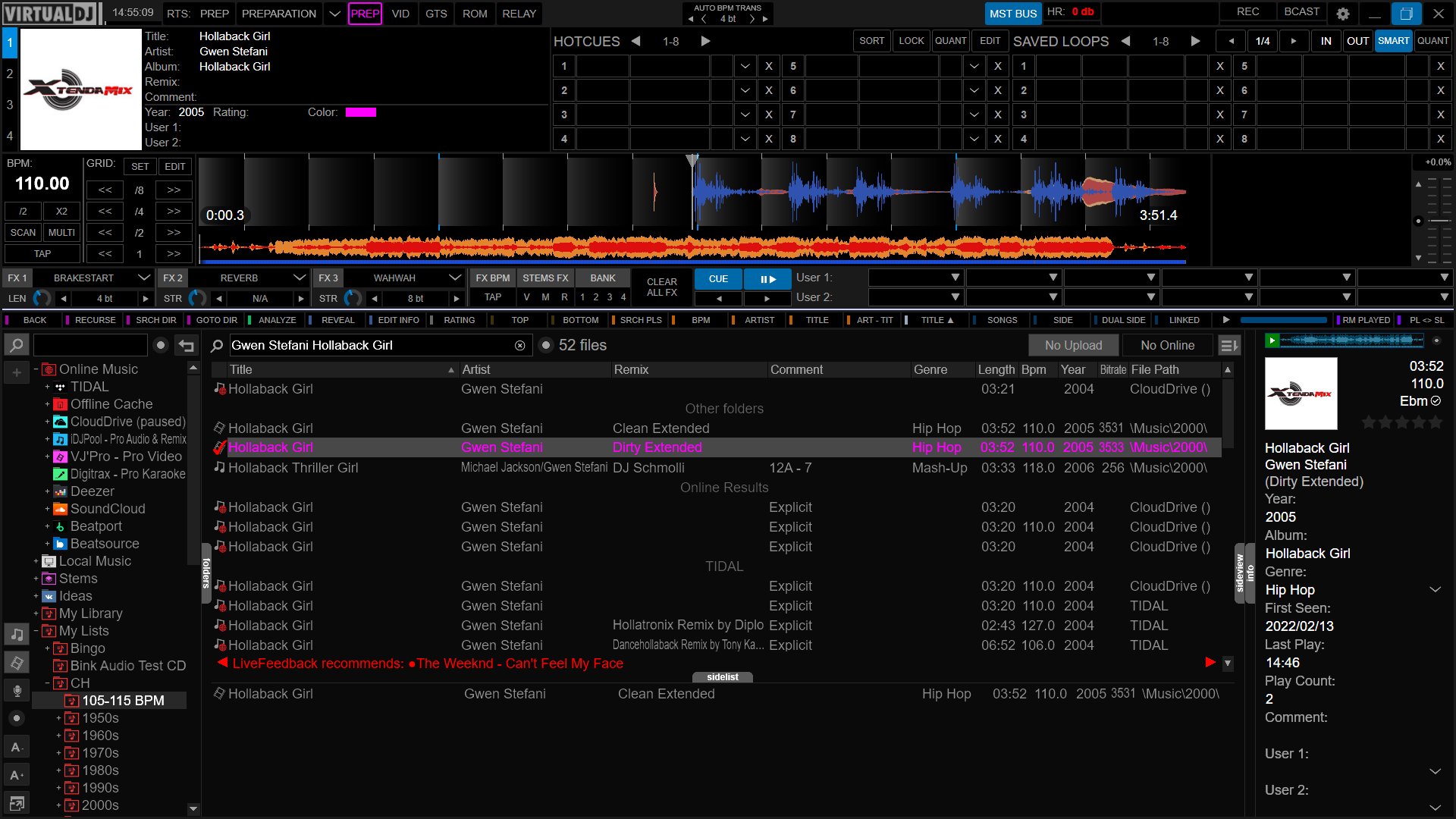
While in PREP mode I do not see the Remix field populate. Also, could you add genre maybe to the right of color?
Thank you for your time on this skin. I am liking it more and more.
[EDIT]Also, maybe a gain adjustment?
Thank you for your time on this skin. I am liking it more and more.
[EDIT]Also, maybe a gain adjustment?
Posted Tue 06 Jan 26 @ 10:59 pm
 Mobile Zombie
This must be the most technical and most complete skin of all times !!
So well done George, you are the skinwizard of all times !! Congratulations to a fantastic work.
So well done George, you are the skinwizard of all times !! Congratulations to a fantastic work.
Posted Wed 07 Jan 26 @ 5:45 pm
